

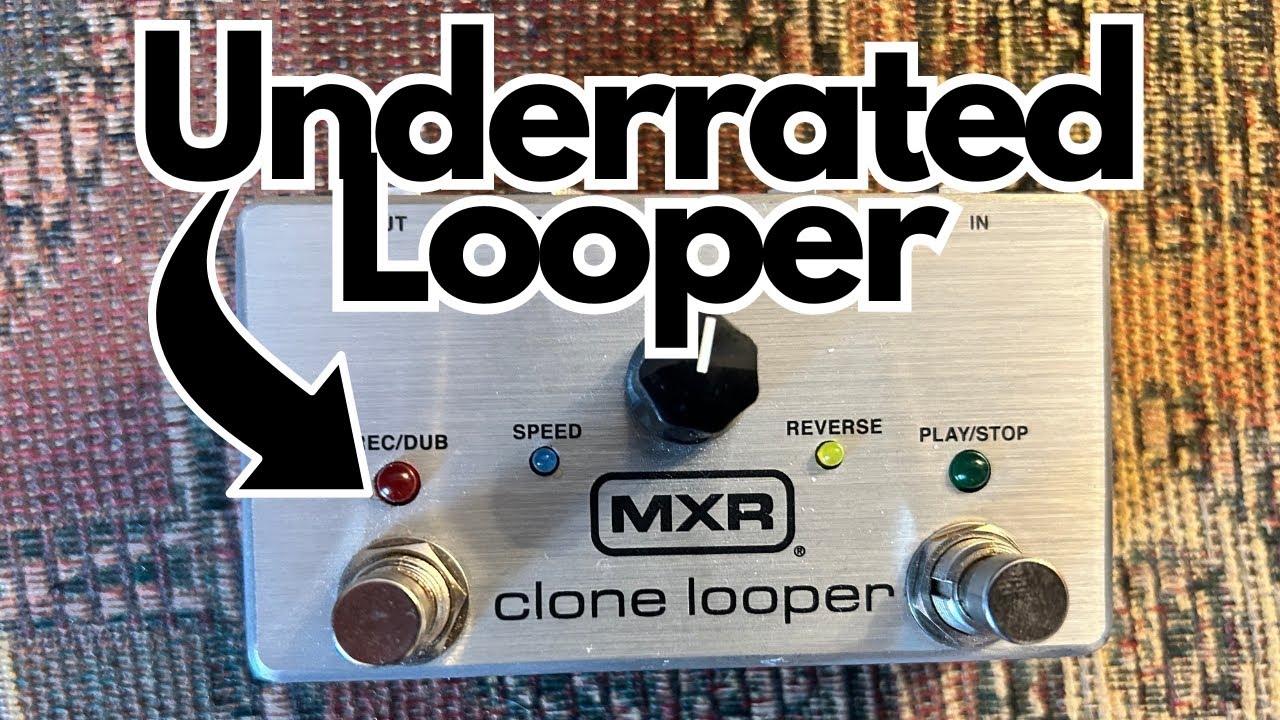
The MXR Clone Looper (on Amazon) is aimed squarely at guitarists who want high audio quality, solid construction, and core creative features—without diving into the deep-menu complexity of big multi-function loop stations.
Overview / First Impressions
The MXR Clone Looper is a single-footswitch, compact looper that punches well above its size:
- High-quality audio with sampling rates up to 88.2 kHz
- Unlimited overdubs
- Core creative functions: reverse, half-speed, double-speed
- Undo/redo for overdubs
- Quiet loop clearing (no unwanted playback when you delete)
- Expression/control jack** for external control
- Switchable true bypass / buffered bypass
It’s not trying to be a multi-track workstation. Instead, it focuses on doing the essentials really well, with a few clever extras that make it very usable in both practice and live settings.
Build Quality & Design
Like most MXR gear, the Clone Looper feels built to survive a tour.
- The chassis is metal (aluminum or steel), and everything about it feels solid and “tank-like.”
- The foot switch is firm and confidence-inspiring—no wobble, no cheap feel.
- The volume knob is a nice size and easy to grab with your foot or hand.
A cool touch: the volume knob glows in the dark, which is genuinely useful on dim stages or in dark studios.
It’s a compact footprint, so it won’t eat up much pedalboard real estate. The layout is simple and uncluttered, which is exactly what you want in a performance looper.
Features & Functions
Despite its size, the Clone Looper packs in a solid set of features that cover most real-world looping needs.
Core Looping Functions
- Record a basic loop
- Playback the loop with a single press
- Overdub with unlimited layers
- Delete overdubs only (without killing the base loop)
- Undo/redo deleted overdubs
That last point is important: being able to remove only the overdubs and then bring them back is great for arranging parts on the fly or cleaning up mistakes without losing your original loop.
Special Playback Modes
The Clone Looper includes three creative functions that can really spice up your loops:
- Reverse – Plays your loop backwards for trippy, ambient, or experimental textures.
- Half-speed – Slows the loop down an octave and cuts the tempo in half. Great for atmospheric parts or creating a “sludgy” version of your loop.
- Double-speed – Speeds your loop up, raising the pitch and tempo. This can be fun for creative transitions or for recording something slow and then playing it back fast.
These modes can be used to transform a simple idea into something more complex and interesting, especially if you stack overdubs with different speed or direction settings.
Quiet Loop Clearing
One very underrated feature: you can clear the loop silently, without the pedal playing it back first.
This is huge for:
- Live performance – You don’t want a random old loop blasting out when you’re trying to reset between songs.
- Recording – Keeps your workflow clean and avoids embarrassing “oops” moments when you’re tracking.
Not every compact looper offers this, and once you’ve used it, it’s hard to go back.
Level Control
There’s a dedicated **volume knob** for the loop level:
- Lets you **blend your loop with your live signal** so it sits right in the mix.
- Great for practice (e.g., keeping your loop a bit quieter so you can hear your lead playing clearly).
External Control & Expression
On the side, you get a **control jack** that opens up more options:
- Expression pedal input:
- Works with most universal expression pedals.
– Typically used to control loop level or other assignable parameters, depending on how you configure your setup.
External Control Switch
MXR recommends using a **proprietary MXR control switch** for best compatibility.
This can let you access additional functions (like reverse, speed changes, or stop/clear) without having to rely solely on the main footswitch.
If you want more hands-free control without upgrading to a massive looper, this is a nice way to extend the pedal’s capabilities.
Bypass Options: True or Buffered
The Clone Looper lets you choose between:
- True bypass, or
- Buffered bypass
You switch modes by:
- Unplugging power.
- Holding down the volume knob.
- Plugging the power back in while still holding the knob.
This is a thoughtful feature if you care about how your signal behaves in a larger pedalboard chain. Buffered bypass can help preserve high-end over long cable runs; true bypass is great if you want the pedal completely out of the circuit when off.
—
How It Sounds / Use Cases
The headline spec here is the 88.2 kHz sampling rate, which is higher than many basic loopers.
What that means in practice:
- Very clear playback that preserves your tone.
- No “cheap digital” feel or noticeable degradation.
- Your loops sound like your guitar and amp, not like a lo-fi recording of them.
Ideal Use Cases
Practice Tool
- Work on timing, phrasing, and layering.
- Great for jamming over chord progressions you record yourself.
- Perfect for drilling scales, arpeggios, and triads over a static chord loop.
Songwriting
- Capture riffs and ideas quickly.
- Build arrangements by stacking overdubs and experimenting with reverse/half-speed/double-speed.
Live Performance
- Use it to build intros, ambient pads, or rhythmic beds.
- Quiet loop clearing and undo/redo make it stage-friendly.
- Glowing knob and simple interface help in low light.
Recording
- Use it to quickly test harmonies and parts before committing to a DAW.
- High audio quality means your loops don’t sound like a compromise when recorded via mic’d amp.
Limitations / Things to Know
The Clone Looper is not a do-everything workstation, and it’s good to be clear on what it doesn’t offer:
1. No battery power
– It’s power supply only.
– Not a dealbreaker for most pedalboards, but worth noting if you rely on batteries.
2. No stereo I/O
– Mono in, mono out only.
– If you run a full stereo rig or want to loop stereo delays/reverbs, this isn’t the right choice.
3. No backing track loading
– You cannot load and play back external backing tracks via USB or SD card.
– It’s meant for live looping of your playing, not for playing pre-recorded tracks.
If you need multi-track storage, long backing tracks, or stereo operation, you’ll want to look at larger, more complex loopers. But for many guitarists, the Clone Looper’s feature set is exactly what they need—and nothing they don’t.
Final Thoughts
The MXR Clone Looper hits a sweet spot:
- Compact and rugged
- High audio quality (88.2 kHz)
- Unlimited overdubs, reverse, half-speed, double-speed
- Undo/redo and quiet clearing** for real-world usability
- Expression/control jack** and switchable bypass modes
It doesn’t try to compete with giant multi-track loop stations. Instead, it focuses on being a high-quality, guitarist-friendly looper that you can trust on a board, in a practice room, or on stage.
If you want a simple yet powerful looper that preserves your tone, gives you genuinely useful creative tools, and feels like it could survive being kicked around a stage for years, the Clone Looper absolutely deserves its place at the table.
Resources & Further Study
If you’re using a looper to improve your playing (which is one of the best ways to use it), working with triads all over the neck is incredibly effective.
A helpful resource mentioned in relation to this approach is available at:
travelingguitarist.com/fretboard-cheatsheet
It focuses on:
- Learning triads across the fretboard
- Using octave mapping to memorize note locations
- Understanding where the root notes are in each triad shape
Combine that kind of fretboard work with a solid looper like the MXR Clone Looper, and you’ve got a powerful setup for building timing, harmony, and musicality.