

If you’re running a modern home studio, gaming rig, or content-creation setup, you quickly run out of ports—especially if you’re on a laptop. That’s where big all-in-one docking stations like the TobenOne 20-in-1 adapter come in.
This dock is aimed at people who need:
- Multiple external monitors (up to four)
- High-speed USB ports for drives and peripherals
- A single, central hub to keep the desk (relatively) sane
From a practical, day-to-day perspective, it’s a solid “plug it in and forget it” solution—especially if you’re juggling drives, displays, and audio gear.
You can grab it here on Amazon if you’re interested.
—
Overview / First Impressions
The best thing about the TobenOne dock is simple: it works the way it’s supposed to.
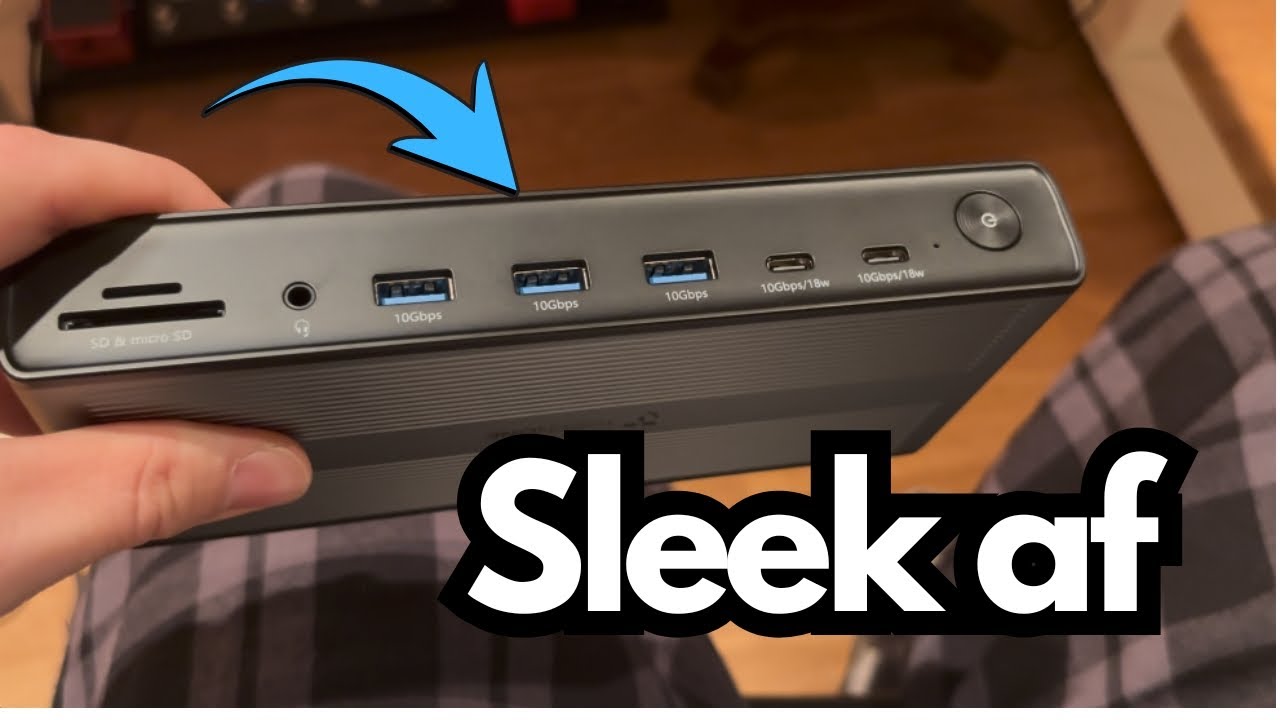
Despite being a 20-in-1 adapter with a ton of I/O, the unit itself is surprisingly compact and sleek:
- Not clunky or awkward
- Easy to tuck under a desk or behind a monitor
- Doesn’t visually dominate your workspace
If you’re the type who likes a clean desk with minimal visible hardware, this form factor makes it easy to hide the dock and just enjoy the extra connectivity.
—
Build & Design
Compact but Feature-Dense
Even with:
- 4 HDMI ports
- 4 DP (DisplayPort) outputs
- Multiple USB ports
- SD and microSD slots
- Ethernet
…the dock remains fairly small. It’s not a tiny travel dongle, but for what it does, the size is very reasonable.
Included Stand
The dock comes with a stand that lets you mount it vertically:
- It fits in the stand snugly and securely
- Great if you like a more organized, “tower-style” layout on your desk
However, if you prefer to hide gear or lay things flat:
- The stand may feel unnecessary
- It’s easy enough to skip and just lay the dock flat under or behind your desk
For example, mine lives under the desk near my guitar pedals and external drives, so the stand stays in the box.
Power Adapter & Cable Length
The dock uses an external power adapter:
- The cable is long enough to be practical for most setups
- The brick is a little on the big side, but nothing unusual for a dock with this much going on
—
Features & Ports
Here’s what you get on the TobenOne 20-in-1 dock.
Front / Side I/O
- SD card slot
- MicroSD card slot
- Headphone jack
- 3 × USB-A ports (10 Gbps)
- 2 × USB-C ports (10 Gbps, 18W)
These are great for:
- Fast external SSDs
- Phones or small devices that need some power
- General high-speed peripherals
Display Outputs
- 4 × HDMI ports
- 4 × DP (DisplayPort) outputs
Even if you don’t use DisplayPort, having four HDMI outputs is a huge deal if you want:
- Triple or quad-monitor setups
- Separate screens for DAW, plugins, browser, and video
- Dedicated displays for streaming or monitoring
To use multiple displays, you’ll need to install the DisplayLink driver. This is:
- Included in the box via a QR code
- Pretty straightforward to set up
Additional Connectivity
You also get:
- 1 extra USB port (480 Mbps)
This slower port is ideal for:
- Keyboard
- Mouse
- MIDI controller
- Dongles that don’t need high speed
- Ethernet port for wired internet—great if Wi-Fi is unstable or you’re streaming/working with large files
—
Real-World Use Cases
Multi-Monitor Productivity
The dock is clearly built with multi-monitor users in mind:
- Supports up to four monitors via HDMI (and/or DP)
It’s perfect for:
- Content creators
- Video editors
- Streamers
- Power users who live in multiple windows at once
In my case, I’m only using:
- Two monitors
- An external backup drive (Seagate Backup Plus) connected through the dock
Even with this lighter load, it’s nice to know the dock can scale up if I ever want to add more screens.
External Drives & Peripherals
With multiple 10 Gbps USB ports, it’s well-suited for:
- External hard drives and SSDs
- Backup drives (like the Seagate Backup Plus)
- Audio interfaces, MIDI controllers, and other peripherals
You can centralize:
- Storage
- Internet (via Ethernet)
- Displays
- Basic audio output (via headphone jack)
…all into one hub.
—
Limitations / Things to Know
Not Bus-Powered
One of the main downsides: the TobenOne 20-in-1 is not bus-powered.
- You must plug it into the wall to use it.
- This makes it:
- Less ideal for ultra-portable, on-the-go use
- Much better suited to permanent desk setups
That said, with the number of displays and devices it can drive, requiring external power is understandable.
The Stand Isn’t for Everyone
- If you like a clean, vertical dock on your desk, the stand is great.
- If you:
- Use a standing/adjustable desk
- Prefer to stash gear under or behind the desk
- Have a pedalboard or other hardware nearby
…you may find the stand unnecessary and just lay the dock flat.
Mixed-Speed USB Ports
- Most USB ports are 10 Gbps (fast).
- One extra USB is 480 Mbps (slower).
- Not a deal-breaker—just assign that port to something low-bandwidth like a mouse or keyboard.
DisplayLink Dependency
To use multiple monitors, you need the DisplayLink driver installed.
This is standard for many high-output docks, but it’s worth noting if you:
- Don’t like installing extra drivers
- Work on locked-down systems where you can’t install software
—
Final Thoughts
If you need a serious, high-capacity dock that can:
- Run multiple monitors
- Handle fast external drives
- Provide plenty of USB ports
- Offer Ethernet and card readers
…the TobenOne 20-in-1 adapter is a very capable option.
Pros:
- Compact and sleek for how much it does
- Up to four monitors via HDMI (plus DP)
- Multiple 10 Gbps USB-A and USB-C ports
- SD, microSD, Ethernet, audio out
Cons:
- Requires wall power (not bus-powered)
- Stand is optional at best for some setups
- One slower USB port (480 Mbps)
- Needs DisplayLink driver for full multi-monitor functionality
If your priority is a stable, feature-rich, desktop docking solution—especially for a multi-monitor workflow—pretty much anything in this range from TobenOne will get the job done, and this 20-in-1 model is a strong choice if you want room to grow your setup.