

If you’re running a modern laptop but your desk setup is starting to outgrow its ports, a solid USB‑C docking station can completely change how you work.
The TobenOne USB‑C Docking Station is designed for exactly that: giving you a true desktop‑style hub with multiple monitors, audio, storage, and peripherals all running through a single cable.
You can grab it here on Amazon if you’re interested.
This dock is especially appealing if you’re:
- Working with multiple displays
- Running a home studio or productivity setup with lots of USB gear
- Using a laptop as your main machine and want a clean, single‑cable connection
Below is a detailed look at how this dock performs and what you should know before buying.
Overview / First Impressions
The standout feature of the TobenOne USB‑C Docking Station is its display support:
- Up to 4 external monitors on Windows/PC
- Up to 3 external monitors on macOS
That alone makes it a strong option for power users who live inside DAWs, video editors, spreadsheets, code editors, or any workflow that benefits from a wide visual workspace.
In the box, you get:
- The docking station itself
- A USB‑C cable
- A large external power brick with detachable AC cable
- Power adapter for wall outlet
The power brick is on the big side, but it’s slim and rectangular, so it tucks easily behind a desk or in a cable tray.
Once everything is connected, you can run multiple monitors, audio interfaces, MIDI controllers, SSDs, SD cards, and more from this single hub.
Build Quality & Design
The dock itself feels solid and well‑made. It has:
- A metal enclosure (steel or aluminum) that gives it a sturdy, premium feel
- A compact, slim profile that sits neatly on a desk or can be tucked behind a monitor
The metal casing not only looks good but also helps with heat dissipation, which is important when you’re running multiple displays and devices.
Port layout is practical and includes pretty much everything you’d expect from a modern, full‑featured dock.
Features & Ports
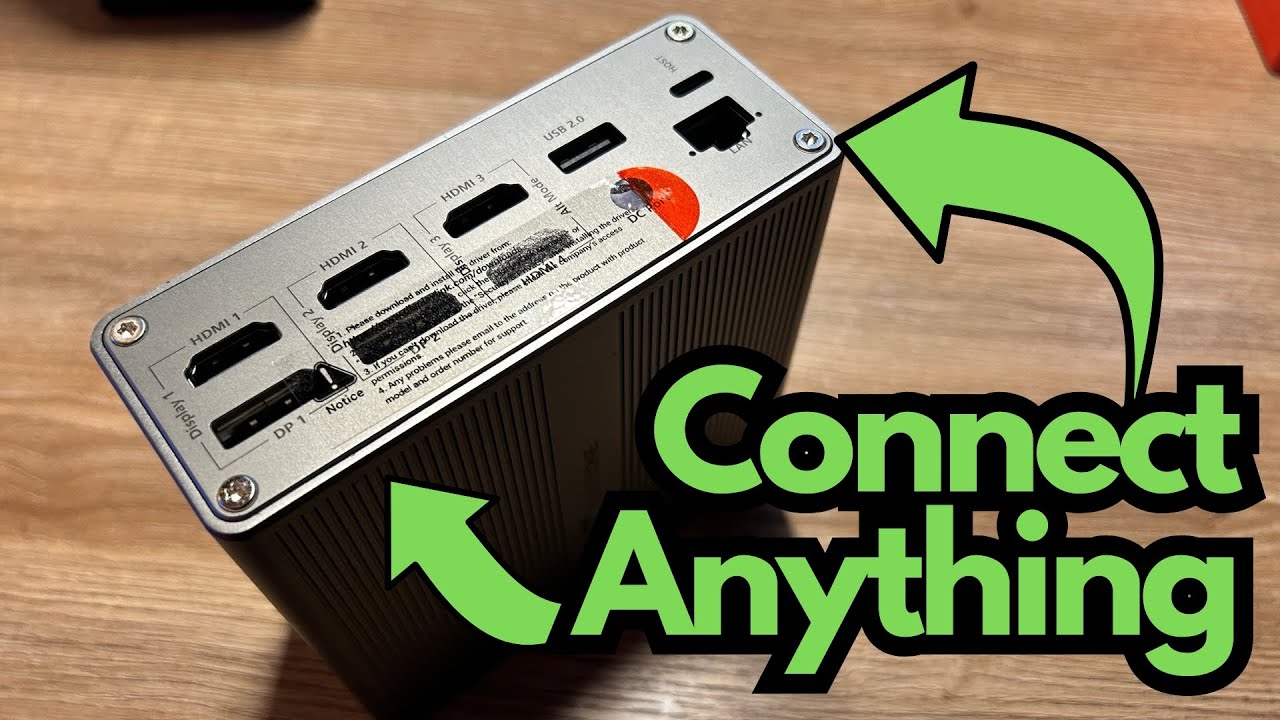
The TobenOne USB‑C Docking Station is loaded with connectivity. On the unit you’ll find:
- USB‑C ports (for host connection and peripherals)
- USB‑A ports (for standard devices like MIDI controllers, interfaces, mice, keyboards, and drives)
- HDMI ports (for external monitors)
- DisplayPort (DP) for additional display flexibility
- Headphone/audio jack
- SD card reader
- Power input and power button
Key capabilities:
Multi‑Monitor Support
- Up to 4 displays on Windows/PC
- Up to 3 displays on macOS
Peripheral Support
- Works with MIDI keyboards and other music production gear
- Supports external SSDs and hard drives
- SD card slot for quick file transfers
Audio Integration
- Works with audio interfaces and studio monitors
- Headphone jack for direct monitoring
Once everything is hooked up, you can have your laptop connected to:
- Multiple monitors
- An audio interface
- MIDI controllers
- External drives
- SD cards
- Headphones or speakers
—all through this single dock.
Setup & Driver Installation
This dock doesn’t work as a pure “plug and play” device. It relies on DisplayLink technology, so you must install drivers before you get full multi‑monitor support.
How to Set It Up
- Connect the dock to your computer via the included USB‑C cable.
- Scan the QR code on the documentation or go to the provided link.
- Navigate to the Downloads section on the manufacturer’s site.
- Download the DisplayLink Manager/drivers for your operating system:
- Windows
- macOS
- Linux (supported as well)
- Install the software and restart your machine if prompted.
Once the drivers are installed, your additional monitors and connected devices should spring to life.
Important: Updating Drivers
If you update your operating system (for example, a major macOS or Windows update), you may need to:
- Reinstall or update the DisplayLink drivers
- Visit the download page again and grab the latest version
If your displays suddenly stop working after an OS update, this is the first thing to check.
How It Performs in Real‑World Use
With everything connected, the dock handles a full desktop‑style setup very well:
- Multiple monitors work as expected
- Audio interface powers up and functions correctly
- MIDI keyboards and controllers are recognized
- External SSDs and SD cards mount properly
In a busy workspace—especially for music production or content creation—you can have:
- A main display for your DAW or editor
- A second for plugins, meters, or reference material
- A third (or fourth on Windows) for browsers, notes, or file management
The dock keeps everything powered and organized, and the single‑cable connection to your laptop is a big quality‑of‑life upgrade.
Limitations / Things to Know
1. Streaming Services & HDCP
Because the dock uses screen‑recording‑style technology under the hood (a characteristic of DisplayLink), services that use HDCP (High‑bandwidth Digital Content Protection) may not work properly on external displays connected through the dock.
That means apps like:
- Netflix
- Hulu
- Other protected streaming platforms
may refuse to play or show a black screen on those displays. This is by design to prevent screen recording of protected content.
If you plan to use those services on external monitors, you may need to connect at least one display directly to your laptop’s native video output instead of through the dock.
2. Driver Dependency
Because this dock relies on DisplayLink:
- It won’t function at full capability without the driver
- Major OS updates may require you to update or reinstall the driver
If you prefer a completely driver‑free solution, this is something to consider.
3. Large Power Brick
The power adapter is relatively large. It’s slim and easy to hide, but if you’re trying to keep cables and bricks to an absolute minimum, this is worth noting.
Final Thoughts
The TobenOne USB‑C Docking Station is a powerful, versatile hub for anyone who needs serious multi‑monitor support and a full spread of ports from a single USB‑C connection.
It’s a strong fit if you:
- Run 3–4 monitors and want a single‑cable laptop setup
- Use audio interfaces, MIDI controllers, and external drives
- Need SD card access and multiple USB ports
- Don’t mind installing and occasionally updating drivers
Just keep in mind the HDCP limitation with Netflix/Hulu and the dependency on DisplayLink drivers.
If your workflow is productivity, creative work, or music production and you want to turn your laptop into a full desktop workstation, this dock delivers a lot of functionality in a compact, solidly built package.