

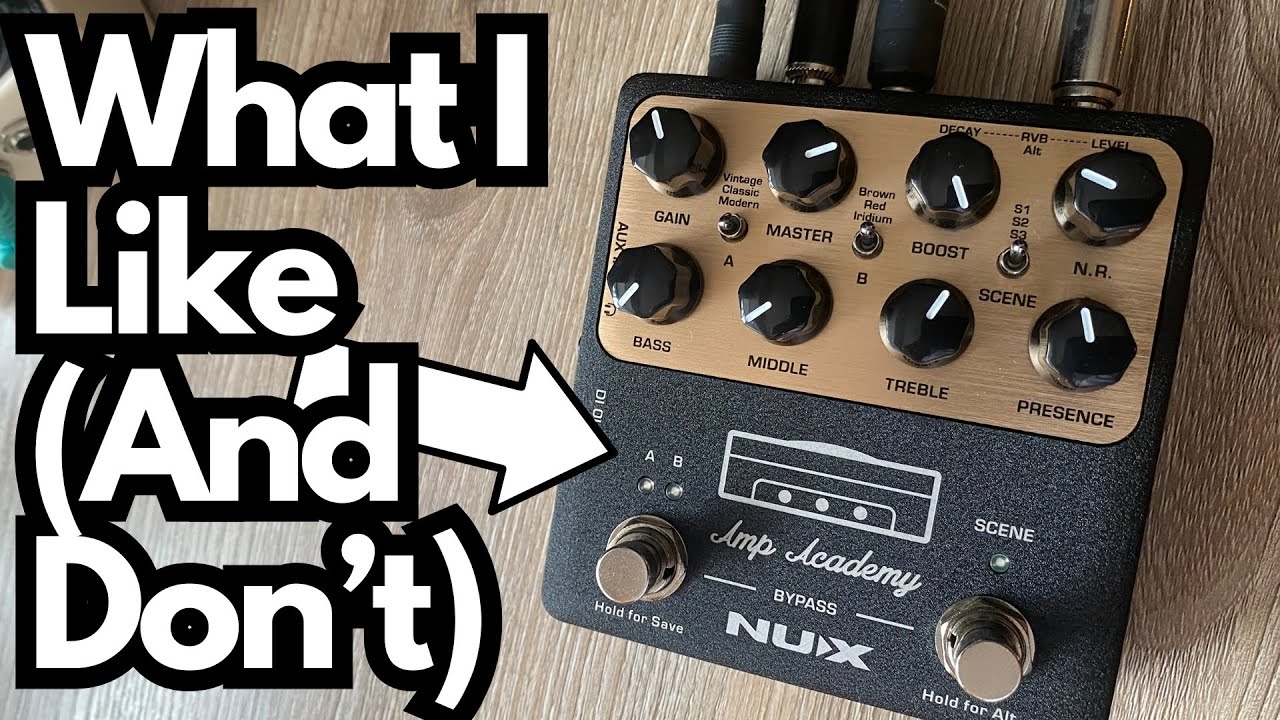
If you’ve been looking for a compact way to get convincing amp tones direct into your interface, mixer, or live rig without hauling a full amp, the NUX Amp Academy is worth a serious look (on Amazon).
. It’s a small box that aims to be the center of your guitar signal chain: amp modeling, cab sim, effects loop, MIDI, USB, and more.
This post walks through first impressions, build quality, how to hook it up, and what it actually sounds like from a guitarist’s perspective.
Overview / First Impressions
The NUX Amp Academy immediately feels like a proper piece of gear rather than a toy. It’s designed to be a direct solution for:
- Recording straight into an audio interface
- Running direct to a mixer or PA
- Building a pedalboard-based rig without a traditional amp
- Practicing silently with headphones or a small setup
The core idea is to give you amp and cab tones in a compact pedal format, with enough routing options to fit into modern guitar workflows—home studio, live, or hybrid.
Build Quality & Design
The first standout is the construction:
- Solid metal enclosure – Everything is housed in a steel casing that feels durable and roadworthy.
- Tactile knobs and switches – The controls feel precise and sturdy. Nothing feels loose, cheap, or flimsy.
- Thoughtful I/O layout – There’s a lot going on, but it’s laid out in a way that makes sense once you spend a few minutes with it.
On the left side of the pedal you’ll find:
- MIDI connections (via mini jacks, typically 1/8″ TRS style)
- Multiple inputs/outputs for integrating with other gear
It also includes a special splitter cable labeled “Send” and “Return.” This is for using the Amp Academy’s effects loop functionality in a very compact way. If you haven’t seen one of these before, don’t worry—it’s just part of the routing system to integrate your external pedals (especially time-based and modulation effects) into the right place in the virtual signal chain.
Overall, the unit gives the impression of something built to withstand regular use, whether on a desk or on a pedalboard.
Features & Functions
Connection Options
You can run the Amp Academy in a few different ways:
- 1/4″ Instrument Out
- Straight into an audio interface
- Direct into a mixing console or PA
- USB-C Connection
- For direct digital connection to a computer (recording, editing patches, etc.)
- Note: This can be more demanding on older or underpowered computers.
- Effects Loop (Send/Return)
- Accessed via the included splitter cable
- Lets you place external pedals (like delay and reverb) after the amp section, where they typically sound best.
MIDI Integration
The mini-jack MIDI ports let you:
- Change presets
- Control parameters
- Integrate Amp Academy into a more complex, MIDI-controlled rig
This is especially handy if you’re running a larger pedalboard or switching system.
Built-In Amp & Cab Modeling
Internally, the Amp Academy offers:
- Multiple amp models you can switch between
- Cab simulation for going direct
- The ability to tweak your sound via the front panel controls and software editor (depending on your setup)
In practice, this means you can treat it like a full amp head and cab in a single pedal.
How It Sounds / Use Cases
Direct into an Audio Interface
One of the most straightforward setups is:
- Guitar → Amp Academy → Audio interface (1/4″ input)
Used this way, the Amp Academy delivers:
- Convincing distortion tones – The gain sounds tight and musical rather than fizzy or thin.
- Usable clean and driven sounds – Swapping amp models gives you different flavors, and they respond well to playing dynamics and picking attack.
Switching amps within the unit gives you noticeably different tones, so you can go from crunch to heavier distortion without needing additional pedals.
Using the Effects Loop for Delay
The included send/return splitter lets you integrate external effects in the loop. For example:
- Plug the splitter into the loop jack on the Amp Academy.
- Connect Send to your delay pedal input.
- Connect your delay output back into Return.
- Run the Amp Academy’s main outputs to your interface or mixer.
This places the delay after the amp modeling—just like you’d typically patch it in an amp’s FX loop. The result:
- Delay sits nicely behind the core tone
- Repeats stay clear and don’t get muddy
- It brings out the “sauce” in lead lines and ambient parts
If you’re used to running delay in front of a real amp, you’ll probably prefer this loop-based routing for higher-gain sounds.
Ideal Scenarios
The Amp Academy shines in:
- Home recording – Simple, quiet, and easy to dial in.
- Silent or low-volume practice – Plug into an interface or headphones (depending on your setup) and keep the neighbors happy.
- Pedalboard rigs – Use your favorite drives, modulation, and delay into Amp Academy as your “amp” at the end of the chain.
- Direct-to-FOH live setups – Skip the amp entirely and send your tone straight to the PA.
Limitations / Things to Know
A few practical notes from using it:
- USB can be demanding on older computers.
If your machine is underpowered or unstable with audio over USB, you may prefer to:- Use the 1/4″ output into your audio interface instead of relying on USB-C.
This is how it was used here, and it worked smoothly. - Effects loop cable may be unfamiliar at first.
The send/return splitter looks unusual if you haven’t seen that style before, but it’s straightforward once you realize it’s just breaking out the loop into two separate jacks. - Learning curve on routing.
There’s a lot going on in terms of I/O and options. Expect to spend a bit of time figuring out:- How you want to connect it (USB vs 1/4″, into interface vs mixer, etc.)
- Where to put your pedals in relation to the Amp Academy (front vs loop)
Once you’ve got your preferred setup dialed in, it becomes much more plug-and-play.
Final Thoughts
The NUX Amp Academy is a compact, well-built solution for guitarists who want amp-quality tones without the physical amp. The tactile controls, solid metal housing, and flexible routing make it feel like serious gear, not a budget compromise.
Highlights:
- Solid construction and reliable-feeling hardware
- Good-sounding distortion and amp models
- Useful effects loop implementation with the included send/return cable
- Multiple connection options for studio, stage, and practice
If you’re building a direct rig, recording at home, or just want a grab-and-go amp solution that fits in your hand, the Amp Academy is an impressive option—especially once you start integrating external effects and exploring its routing possibilities.
Resources & Further Study
If you’re using something like the Amp Academy for practice and want to improve your fretboard knowledge and improvisation, these resources can help:
- Fretboard Memorization Cheat Sheet – Available at travelingguitarist.com.
- Covers major and minor triads in every key
- Uses octave mapping and other techniques to help you:
- Memorize the notes on the fretboard
- Understand basic harmony and chord construction
- Improvise more confidently in multiple keys
- Traveling Guitarist Forum – forum.travelingguitarist.com
- A place to talk guitar, music, gear, and related topics with other players.
Combining a flexible tool like the NUX Amp Academy with solid fretboard and harmony knowledge can make your practice and recording sessions far more productive and musical.