

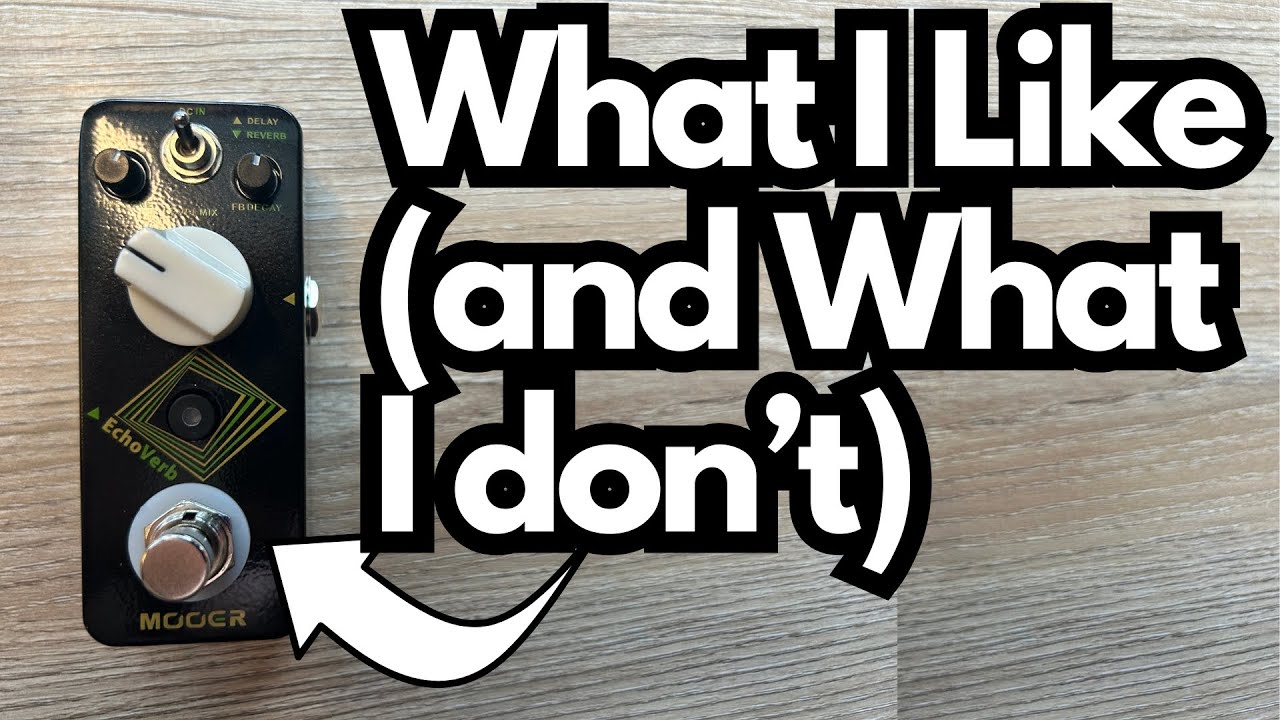
If you’re tight on pedalboard space or budget but still want both delay and reverb at your feet, the Mooer EchoVerb is a seriously interesting option. You can get it here on Amazon.
It’s a tiny dual-effect pedal that combines two of the most essential ambient effects into one mini enclosure, with a clever control layout that changes based on which effect you’re editing.
This post walks through how it works, how it sounds, and who it’s really for—from a guitarist’s perspective.
Overview / First Impressions
The EchoVerb is a mini-format pedal that packs both a digital delay and a reverb into a single box. You don’t get deep editing menus or a million presets; instead, you get a straightforward, gig-friendly tool that aims to cover your basic ambient needs in the smallest possible footprint.
Out of the box you get:
- The pedal itself
- An instruction manual
- A sticker
It’s clearly designed for players who:
- Want delay and reverb but don’t want (or can’t fit) two separate pedals
- Are building a compact or travel board
- Don’t want to spend Hall of Fame + Carbon Copy money, but still want usable tones
Build Quality & Design
Physically, the EchoVerb is:
- Very small – classic mini-pedal footprint
- Top-mounted power jack – 9V DC input on top, which is ideal for crammed boards
- True bypass – when it’s off, your dry signal passes through unaffected
- Single footswitch – for on/off and tap tempo
On the face of the pedal, you’ll find:
- A mini toggle switch that selects which effect you’re editing:
- Down = Reverb
- Up = Delay
- Three control knobs whose function changes depending on that toggle position
That last point is the key to understanding this pedal.
Features & Functions
Dual-Function Controls
The EchoVerb uses the same three knobs to control either the reverb or the delay, depending on the position of the toggle switch.
When the switch is DOWN (Reverb mode):
- Knob 1: Reverb Mix
- Knob 2: Reverb Tone
- Knob 3: Reverb Decay (length of the reverb tail)
This lets you dial in anything from a subtle room-style ambience to a longer, more atmospheric wash.
When the switch is UP (Delay mode):
- Knob 1: Delay Time
- Knob 2: Delay Level (volume of repeats)
- Knob 3: Delay Feedback (number of repeats)
So instead of separate sections for delay and reverb, Mooer keeps everything compact by repurposing the same knobs based on the toggle position.
Tap Tempo
The footswitch does more than just turn the pedal on and off:
- Standard press: Engage/bypass the effect
- Hold the switch: Enter tap tempo mode
- Tap in a new tempo:
- For example: tap “one, two” along with the song’s pulse
- The pedal then sets the delay time to match your taps
This is especially handy if you’re playing live and want your delay to lock in with the song’s tempo rather than guessing the time with the knob.
How It Sounds / Use Cases
Delay
The delay side is straightforward and musical. In practice:
- You can set it for:
- Short slapback echoes for country/rockabilly
- Medium, rhythmic delays for lead lines
- Slower, more spacious repeats for ambient parts
- The Level control is important:
- Turned up too high, the repeats can overpower your dry tone
- Dialed back a bit, it sits nicely behind what you’re playing
With tap tempo and some careful adjustment of the feedback, it’s easy to dial in a delay that follows the groove of whatever you’re playing.
Reverb
The reverb is designed more as a general-purpose ambience than a deep, multi-algorithm studio reverb:
- Mix: Controls how present the reverb is
- Tone: Lets you brighten or darken the tail
- Decay: Controls how long the reverb hangs on
You can:
- Add just a touch to make your clean tone less dry
- Push the decay for a more atmospheric, pad-like background
It won’t replace a high-end, fully programmable reverb if you live in ambient/shoegaze territory, but it’s more than enough for most rock, pop, worship, and general-purpose tones.
Practical Scenarios
For guitarists, this pedal works well if:
- You’re running into a clean amp and want both delay and reverb without a big board
- You’re building a small grab-and-go rig or fly rig
- You’re just getting into effects and want to cover the essentials cheaply
It’s also a useful backup pedal: if your main delay or reverb dies at a gig, this can cover both jobs in a pinch.
Limitations / Things to Know
A few practical considerations:
- Shared controls:
- You can’t see both your delay and reverb settings at the same time because the knobs change function based on the toggle switch.
- This is the trade-off for the tiny size.
- Not as flexible as separate high-end pedals:
- If you already own something like a TC Electronic Hall of Fame for reverb and an MXR Carbon Copy for delay, those will offer richer tones and more nuanced control.
- The EchoVerb sits more in the “good, practical, budget-friendly” lane than the “premium tone sculpting” lane.
- No separate on/off for delay and reverb:
- It’s a single effect block—if you want independent control over when your delay and reverb come on, you’ll need two pedals.
- Digital character:
- The delay and reverb are both digital. If you’re specifically chasing analog delay warmth or spring-tank authenticity, this won’t fully scratch that itch.
Final Thoughts
The Mooer EchoVerb is a smart little pedal for guitarists who:
- Need both delay and reverb in a tiny footprint
- Are working within a tight budget
- Prefer simple, functional controls over deep menus and presets
If you already own top-tier pedals like the TC Hall of Fame and the MXR Carbon Copy, the EchoVerb probably won’t replace them. But as a compact, cost-effective two-in-one solution, it makes a lot of sense—especially for smaller boards, backup rigs, or players who just want solid, usable ambient tones without a big investment.
How to Use The Mooer EchoVerb
Check out my tutorial on how to actually use it which you can find on my other YouTube channel, Andrew Siemon.
Resources & Further Study
If you’re looking to improve your playing and make better musical use of effects like delay and reverb, understanding the fretboard and harmony is huge.
- Fretboard Memorization Cheat Sheet – TravelingGuitarist.com
A triad-based system that maps out major and minor triads in every key using octave mapping and other techniques. It helps you:- Memorize the notes on the fretboard
- Improvise in multiple keys
- Understand the harmonic foundation behind your chords and lines
- Traveling Guitarist Forum – forum.travelingguitarist.com
A place to talk guitar, music, gear, and more with other players.
Pair a solid understanding of triads and fretboard layout with a versatile delay/reverb like the EchoVerb, and you’ll have both the tools and the knowledge to create more musical, expressive guitar parts.