

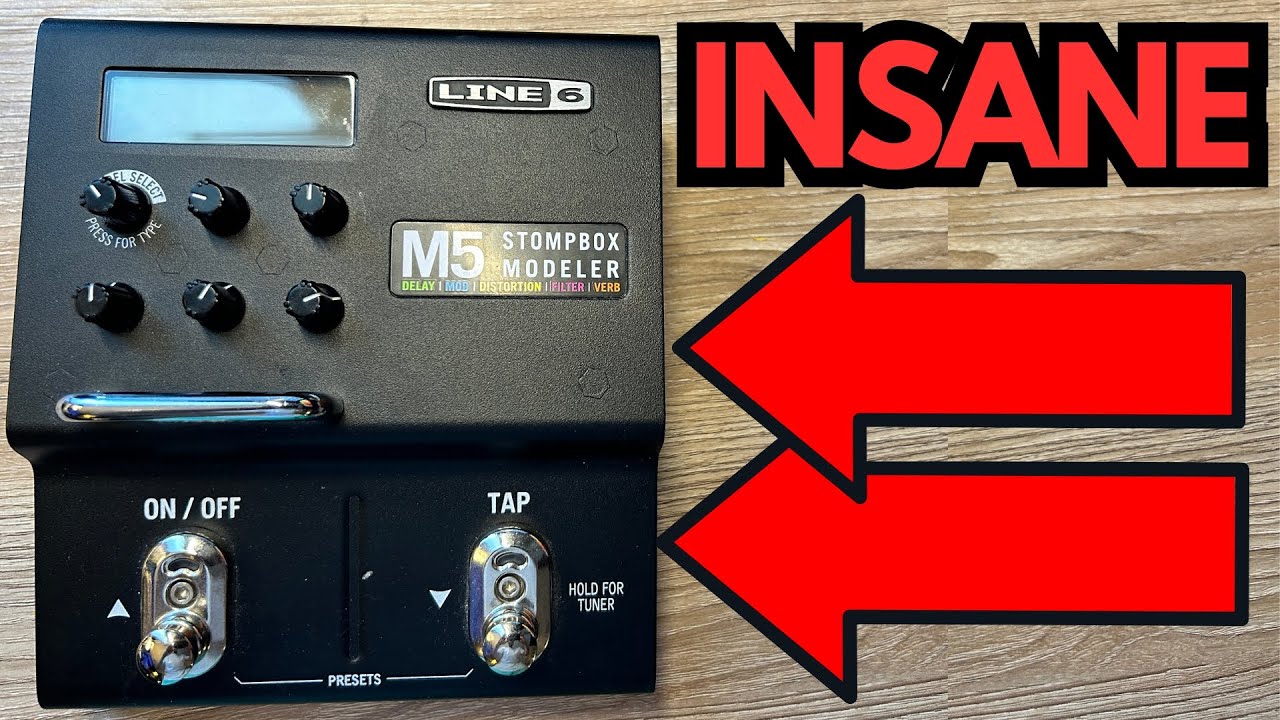
If you’ve ever wished you could cram a whole effects board into a single pedal, the Line 6 M5 Stompbox Modeler is about as close as it gets. It’s not new, it’s not flashy by today’s standards, but for a lot of guitarists it quietly becomes the most useful pedal they own.
This is aimed at players who want:
- A compact “do-it-all” pedal for gigs, jams, or practice
- Access to a huge range of effects without building a massive board
- Solid, gig-ready tones without spending boutique money
Let’s dig into what makes the M5 so versatile, and why it still holds up despite its age.
You can grab it here on Amazon if you’re interested.
Overview / First Impressions
The M5 is basically a single-effect version of Line 6’s larger M-series units. Think of it as a virtual drawer full of classic and modern stompboxes, but you can only pull one out at a time.
It gives you five broad effect categories:
- Delay
- Modulation
- Distortion/Drive
- Filter
- Reverb
Inside each category you’ll find a ton of individual effects—usually somewhere between 10 and 20 per type. You scroll through them with the main knob, tweak a few parameters, and you’re off.
At first glance, it doesn’t look like anything wild: a smallish black box, a screen, some knobs, and two footswitches. But once you start scrolling through the models, it becomes obvious just how much is packed into this thing.
Build Quality & Design
From a guitarist’s perspective, the M5 feels like a proper stompbox, not a fragile multi‑FX toy.
Physical build:
- Sturdy metal enclosure
- Two solid footswitches (for effect on/off and tap/scroll functions)
- Clear screen with effect name and parameters
- A handful of knobs for fast tweaking
Power & connectivity:
- Runs on 9V DC, but it draws about 500 mA, so you’ll need a decent power supply (like a Voodoo Lab Pedal Power 3+ or a similar high-current brick)
- MIDI In and Out/Thru for deeper control or integration with a larger rig
- Expression pedal input for controlling parameters in real time (Line 6 expression pedals work best; some third-party options like the M-Audio EX-P don’t play nicely)
It’s built to live on a pedalboard and take a beating, and the layout is straightforward enough that you can tweak it quickly onstage.
Features & Functions
The real magic of the M5 is the sheer variety of effects it offers in a single slot on your board.
Effect Categories
1. Reverb
Classic and creative spaces, including:
- Plate
- Room
- Chamber
- Hall
- 63 Spring
- Ducking reverb
- Octo (shimmer-style)
- Tile
- Particle and other more experimental verbs
2. Delay
Everything from subtle slapback to ambient washes:
- Tube Echo
- Tube Echo Dry Thru
- Tape Echo
- Multi-Head
- Analog Echo
- Reverse Delay
- Dynamic Delay
- Auto-Volume Echo
- Echo Platter, and more
3. Modulation
Chorus, vibrato, and phaser flavors:
- Opto Tremolo
- Phaser
- Dual Phaser
- Vibrato-type effects
- Other modulation staples that cover most classic sounds
4. Distortion / Drive
Multiple flavors of dirt:
- Tube-style overdrives
- Heavier distortion models
- Various drive characters that can cover anything from light breakup to high gain
5. Filter & Special FX
For more expressive and weird tones:
- Auto-wah
- Envelope-style filters
- Other synthy or filter-based textures
Parameters & Control
Each effect typically offers 3–5 tweakable parameters. For example, on a reverb you might see:
- Decay
- Time / Pre-delay
- Tone
- Mix
Delays and modulation effects give you the usual suspects: time, depth, feedback, speed, tone, and so on. You can dial in fairly precise sounds without menu-diving for hours.
You can also:
- Use an expression pedal to control one or more parameters (like delay mix or modulation depth) in real time
- Use MIDI to change patches or sync with a larger rig
How It Sounds / Use Cases
Despite its age, the M5 still sounds surprisingly good. It’s not trying to be a hyper-detailed studio plug‑in; it’s about practical, musical tones that work in a mix.
Reverb
The reverbs range from subtle room sounds to huge ambient washes:
- Plate and Hall: Great for always‑on ambience or lead tones.
- Chamber and Room: More natural and controlled; perfect for rhythm work.
- Octo and Particle-style verbs: Ideal if you like ambient or post-rock textures.
You can easily go from a touch of space to massive, atmospheric tails just by adjusting Decay and Mix.
Delay
There are lots of usable delay options:
- Tube and Tape Echo: Warm, musical repeats that sit nicely behind your dry tone.
- Analog Echo: Darker repeats that don’t clutter up your playing.
- Reverse Delay: For trippy, backwards textures.
- Dynamic Delay: Repeats that duck under your playing and swell up when you stop.
- Auto-Volume Echo: Swell-style sounds that feel like volume pedal work plus delay—great for ambient pads and cinematic lines.
For most gigging guitarists, this covers just about every delay scenario you’d reasonably need.
Modulation
The modulation effects are very usable:
- Phaser / Dual Phaser: From subtle movement to more dramatic sweeps.
- Opto Tremolo: Classic pulsing trem sounds.
- Vibrato-type effects: For seasick or subtle pitch wobble depending on depth.
They might not replace your favorite boutique modulation pedal if you’re super picky, but they’re more than good enough for live use and general recording.
Distortion & Drive
The dirt section is surprisingly solid:
- Can handle heavy distortion for rock and metal
- Also does tube-style overdrive for blues, rock, and pushed-amp sounds
If you already have a favorite primary drive pedal, the M5 can act as your “extra” gain stage or specialty dirt sound. If you don’t, it can absolutely cover your basic drive needs.
Filters & Special FX
Auto-wah and filter effects are particularly handy if:
- You don’t want a dedicated wah or envelope filter on your board
- You occasionally need funky or synthy textures
They’re not just gimmicks; they can be genuinely musical when dialed in.
Limitations / Things to Know
The M5 is powerful, but it’s not perfect. A few things to keep in mind:
- One effect at a time
This is the biggest limitation. You can’t stack, say, delay and reverb inside the M5. It’s one slot, one effect. If you need complex chains, you’ll either:- Use the M5 alongside other dedicated pedals, or
- Step up to a bigger multi‑FX unit.
- Older interface & screen
The display isn’t the brightest or most modern-looking, and depending on lighting (or your camera, if you film), it can be a bit hard to see. Still totally functional, just not flashy. - Power requirements
At 500 mA, it pulls more current than many single pedals. Cheap daisy chains or low-current supplies may struggle. A proper isolated supply is strongly recommended. - Expression pedal compatibility
Not every expression pedal works well. For example, the M-Audio EX-P doesn’t control it reliably. Line 6’s own expression pedals are the safest bet. - It’s not the newest tech
If you’re chasing the absolute latest in IRs, amp modeling, or ultra-high-definition effects, this isn’t that. It’s more of a workhorse stompbox library than a full-blown modern modeling ecosystem.
Final Thoughts
From a guitarist’s perspective, the Line 6 M5 is one of those pedals that quietly solves a lot of problems:
- Need a backup for your main delay? It’s in there.
- Need a tremolo for one song on a set? It’s in there.
- Want to experiment with weird reverbs or filters without buying dedicated pedals? Also in there.
It’s incredibly versatile, sounds better than you’d expect for its age, and can easily earn a permanent spot on a board as your “utility” effect. For many players, it ends up being one of the best-value purchases they make.
If you can live with the “one effect at a time” limitation and you’ve got a good power supply, there’s really no reason not to consider the M5 as your all-purpose effects toolbox.
Resources & Further Study
If you’re looking to level up your playing alongside your gear:
Fretboard Memorization Cheat Sheet
Available at travelingguitarist.com/fretboard-cheat-sheet – a PDF that lays out all the major and minor triads in every key. It uses the “octave mapping” approach and a few other techniques to help you:
- Memorize the notes on the fretboard
- Understand triads as the foundation of chords and harmony
- Start improvising more confidently in multiple keys
Traveling Guitarist Forum
At forum.travelingguitarist.com you can discuss guitar, gear, theory, and music with other players, ask questions, and share your progress.