

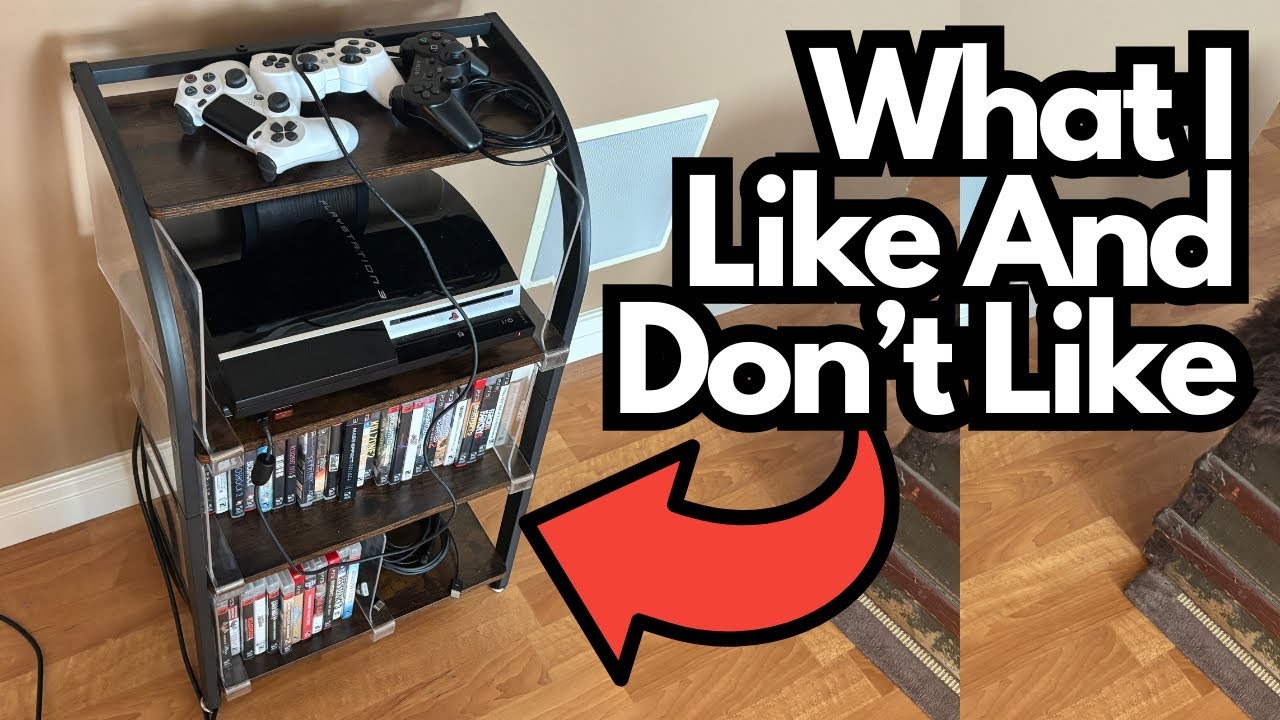
If you’re trying to clean up your living room, bedroom, or gaming nook, a dedicated console station can seem like the perfect solution. A place for your console, your games, your cables—what’s not to love?
This particular budget gaming console station looks the part and costs next to nothing, but it comes with a few quirks that are worth knowing about before you buy. If you’re handy with basic tools and don’t mind a little DIY, it might be a solid value. If you want plug‑and‑play furniture, you may want to think twice.
You can grab one here on Amazon if you’re interested.
Overview / First Impressions
Visually, this console station is surprisingly nice for the price:
- The wood finish on top is actually particle board, but it looks better than you’d expect.
- It pairs well with hardwood floors and other wood furniture.
- It doesn’t look cheap from a distance and fits into a typical living-room setup pretty well.
Assembly out of the box is straightforward. You can get it built and in place without much trouble.
However, once you start actually using it—with real consoles, real games, and real cables—the compromises show up quickly.
Build Quality & Design
Materials
- Top surface: Particle board with a decent-looking finish
- Overall feel: Light and budget-friendly, not premium
- Aesthetic: Works well in a cozy room, especially with wood floors or other natural tones
From a design perspective, it’s more about looks than smart functionality.
Game Storage Issue
The storage spaces for your games are open-ended, and that’s a problem:
- Games don’t naturally stand upright on their own.
- Without something to block the ends, they’ll just fall out of the sides.
To fix this, extra dividers were added manually to wall off some space and keep the games from sliding out. If you have spare dividers or small boards around the house, you can do the same. It helps a lot—but it’s not how it should work out of the box.
Features & Functions
What It’s Supposed to Do
The station is designed to:
- Hold a gaming console (e.g., PS3, PS4, etc.)
- Provide storage for games
- Route cables through holes in the back or sides for a cleaner look
On paper, that’s exactly what most people want in a compact gaming stand.
Cable Management Problems
In practice, the cable management is the weakest part:
- The pre-drilled holes for cables are too small or poorly placed.
- A standard HDMI cable from a PS3 couldn’t pass through the existing holes properly.
- To make it usable, it was necessary to drill an additional hole so the HDMI cable could reach where it needed to go.
Maybe a slimmer console or different generation (like a PS4) would work better with the stock holes, but as it stands, the layout just isn’t well thought out.
How It Works in Real Use
Once you’ve:
- Added your own dividers for the games, and
- Drilled an extra hole for cables
…the station does what you’d expect:
- It holds the console securely.
- It keeps games relatively organized.
- It looks decent in the room.
Given how little it cost, the fact that it functions at all after a bit of DIY is almost impressive. But that’s the catch: it only becomes “good enough” after you fix its shortcomings.
Limitations / Things to Know
Before you buy something like this, keep these points in mind:
You’ll Probably Need Tools
To get it working properly, you’ll likely need:
- A drill (for additional cable holes)
- Some kind of dividers or blocks (to keep games from falling out)
- Basic DIY know-how and a bit of patience
If you’re not comfortable modifying furniture, this may not be the right choice.
Out-of-the-Box Usability
Without modifications:
- Cables may not fit or route cleanly.
- Games will not stay neatly in place.
- The advertised functionality doesn’t fully match real-world use.
Long-Term Durability
Because it’s particle board and very inexpensive:
- Don’t expect it to handle a lot of moving around.
- Be gentle when drilling or screwing into it—over-tightening or rough handling can damage it.
Who This Stand Is For
This console station might be a good fit if:
- You’re on a very tight budget.
- You don’t mind modding cheap furniture to make it work.
- You mainly care that it looks decent and holds your console in one place.
It’s probably not for you if:
- You want a plug-and-play solution that just works.
- You don’t own tools or don’t want to drill into new furniture.
- Cable management and clean, reliable storage are high priorities.
Final Thoughts
This budget gaming console station is a classic example of “you get what you pay for.”
- Pros:
- Extremely inexpensive
- Looks surprisingly good in a room
- Basic assembly is easy
- Cons:
- Poor cable-routing design; may require drilling new holes
- Game storage isn’t functional without added dividers
- Build quality is strictly budget-level
If you’re handy, have tools, and love squeezing value out of cheap gear, you can turn this into a workable console station with a bit of effort. But if you want something that functions perfectly right out of the box, it’s hard to recommend.