

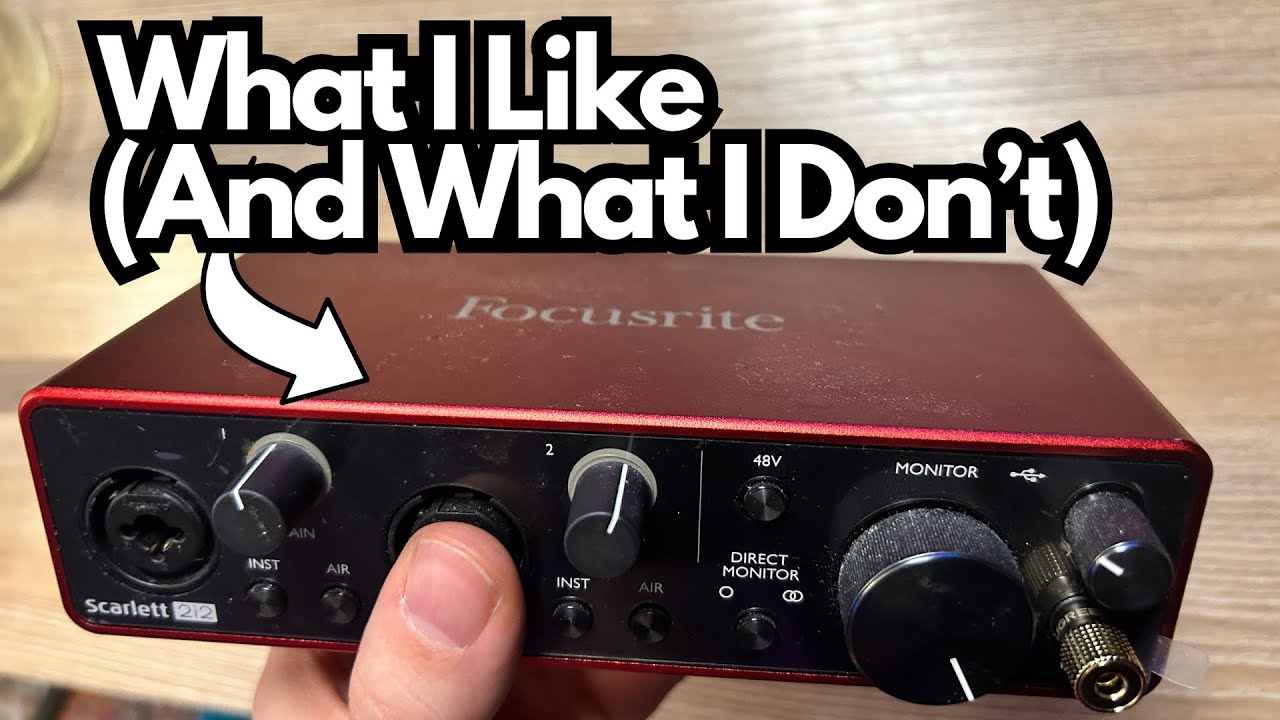
If you’re a guitarist or home producer looking for a no-fuss, reliable way to get great audio into your computer, the Focusrite Scarlett 2i2 (on Amazon) is one of those pieces of gear that just quietly does its job.
It’s the interface I recommend to almost anyone who asks, especially players or producers who want to record multiple sources at once.
This is not the flashiest, most feature-packed interface out there—but that’s exactly why it’s so good. It’s solid, sounds great, and doesn’t get in your way.
Overview / First Impressions
The Scarlett 2i2 is a compact, bus-powered USB-C audio interface with:
- Two combo inputs (XLR / ¼”) — each can function as mic, line, or instrument
- Simple, intuitive front-panel controls
- Headphone and monitor outputs
It’s built for people who want to plug in and record without wrestling with drivers, menus, or complex routing. Guitarists, vocalists, podcasters, duos, and home producers benefit the most from the expanded two-input setup.
The standout thing about it: reliability. I’ve used Focusrite interfaces for close to a decade, and they just keep working. The Scarlett 2i2 follows that same tradition—no weird glitches, no random noise, and no “why won’t this connect today?” drama.
Build Quality & Design
The Scarlett 2i2 feels like a proper piece of studio gear, not a toy.
- Chassis: Solid metal (aluminum or steel alloy). Tough enough for a backpack, rehearsal space, or session bag.
- Weight: Substantial enough to stay put on your desk—your cables won’t drag it around.
- Feet: Rubberized pads that prevent sliding even with frequent cable swapping.
The layout is clean and intuitive:
- Front panel: Two combo inputs, gain knobs for each channel, “Air” buttons, direct monitoring, and a headphone jack.
- Back panel: USB-C port and balanced TRS monitor outputs.
Everything is spaced nicely and the knobs feel solid—not loose or cheap.
Features & Functions
Inputs
- Two Combo Inputs (XLR / ¼”)
Each channel can operate as a mic input, a line input, or an instrument (Hi-Z) input. This gives much more flexibility than a one-in/one-out setup—perfect for recording guitar + vocals, two mics, stereo keyboards, or a modeler’s stereo output.
Gain & Level Indicators
Each input has its own gain knob with Focusrite’s signature color ring for visual feedback:
- Green = healthy level
- Red = clipping (turn it down)
It makes level-setting dead simple, even if you aren’t looking at your DAW.
Handles Active Pickups Well
The Scarlett 2i2 handles active pickups without issue and gives you a good, usable gain range. Some interfaces freak out with hotter signals, but the 2i2 remains controlled and flexible.
If you switch between passive and active guitars often, this matters.
Instrument vs Line Level
Each channel clearly switches between:
- Instrument mode: For plugging guitars/basses directly in.
- Line level: For keyboards, modelers, preamps, drum machines, etc.
Proper gain staging = cleaner, more accurate recordings.
“Air” Button
The Air feature adds a subtle high-end lift, giving your tone more presence—especially useful for:
- Clean electric guitars
- Acoustic instruments
- Vocals recorded with a condenser
It’s a tasteful enhancement, not a gimmick.
Direct Monitoring (Stereo)
The Scarlett 2i2 includes direct monitoring so you can hear yourself with zero latency, even if your session is loaded with plugins or your buffer size is higher than usual.
Stereo monitoring is especially helpful when recording two inputs at once—your playing feels more natural and you aren’t fighting DAW latency.
Phantom Power (48V)
48V phantom power is available and required for condenser microphones or some active DI boxes.
Both mic preamps are clean, quiet, and perfectly suitable for home studio vocals, podcasting, and acoustic instruments.
Monitoring & Outputs
- Headphone output: Front panel with its own level knob.
- Monitor outputs: Balanced TRS jacks on the rear panel.
You get more output flexibility than the Solo simply because of the dual-input setup and improved monitoring options.
USB-C Connectivity
USB-C, bus-powered, no external supply required. Plug-and-go simplicity.
How It Sounds / Use Cases
Sound Quality
The Scarlett 2i2 is clean, clear, and transparent. It doesn’t impose a sound on your tone—it captures your guitar, mic, or instrument accurately without noticeable coloration or noise.
For home studios and project setups, it’s more than enough.
Ideal Use Cases for Guitarists & Producers
- Recording vocals + guitar at the same time
- Stereo keyboards, synths, or modelers (Helix, Kemper, QC)
- Direct guitar or bass into amp sims
- Re-amping (depending on setup)
- Podcasting with two mics
- Collaborating with another musician live
The two-input flexibility is the main reason many people choose the 2i2 over the Solo—it handles far more situations without needing extra gear.
Limitations / Things to Know
It’s an excellent interface, but not perfect for everyone. A few things to understand:
No MIDI I/O
Just like the Solo, the 2i2 does not include MIDI ports. If you rely on 5-pin MIDI gear, you’ll need a separate USB MIDI interface or a keyboard with USB built in.
Only Two Inputs
You now get:
- 2 x mic/line/instrument combo inputs
That’s a big upgrade from the Solo—but still not enough for:
- Drum recording
- Multi-mic guitar cabinet setups
- Full-band live tracking
- Multiple vocalists at once
If you need more than two simultaneous inputs, you’ll want to step up to the 4i4 or 8i6.
Limited Outputs
You get a single pair of monitor outputs and one headphone output—plenty for a small studio, but not ideal if you want multiple headphone mixes.
Final Thoughts
The Focusrite Scarlett 2i2 is one of those rare pieces of gear that you buy, set up once, and then forget about because it just works.
From a guitarist or home producer’s perspective, the highlights are:
- Two flexible combo inputs
- Clean, reliable sound
- Handles active pickups gracefully
- Stereo direct monitoring
- Solid construction and stable operation
- USB-C connectivity and bus power
The only real drawbacks—no MIDI and a limited number of I/O—only matter if you’re building a more complex recording setup. For most solo musicians, singer-songwriters, guitarists, or small production environments, the Scarlett 2i2 is an ideal choice and an incredible value.
I own multiple interfaces, and I’m genuinely glad to have the Scarlett 2i2 in the lineup. It’s the kind of unit you can trust to get you through any session without drama.
Resources & Further Study
If you’re getting into recording and mixing with an interface like the Scarlett 2i2, there’s a free mixing cheat sheet available at:
- ProducerSociety.com – practical tips to improve your mixes.
- You can also join the community forum at forum.producersociety.com for discussions, tips, and help with home recording setups.
Those resources pair nicely with a simple, reliable interface like the Scarlett 2i2 and will help you get better results out of the gear you already have.