

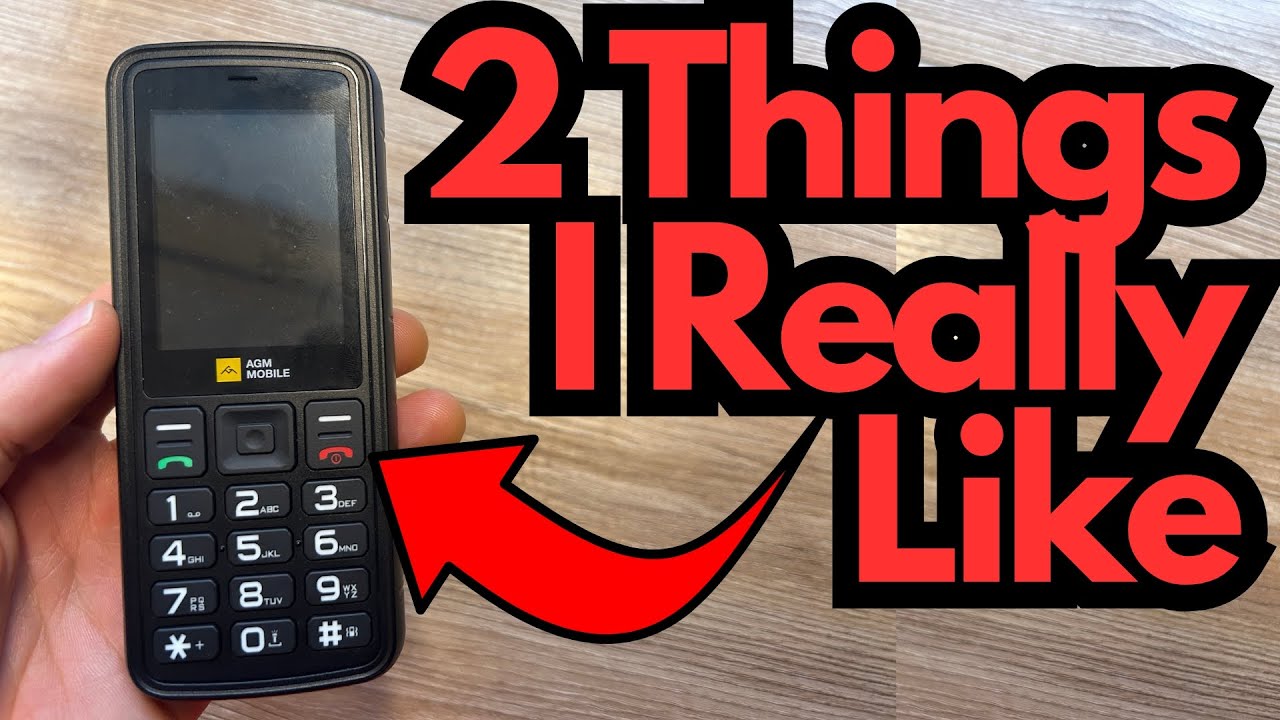
If you’ve ever thought about stepping back from your smartphone without going completely off the grid, a minimalist “dumb” phone can be a surprisingly practical middle ground.
It won’t replace your laptop, your camera, or your DAW—but it can free you from constant notifications, social feeds, and endless scrolling. You can grab one here on Amazon if you’re interested.
This post walks through what it’s actually like to live with a simple, stripped-down phone as your daily driver: how it works, what it does well, where it falls short, and a few tricks to make it more useful.
Overview / First Impressions
The basic idea here is simple: use a minimalist phone as your primary device, and relegate your smartphone to “home base” duty—videos, end-of-day browsing, and anything that truly needs apps.
In practice, this setup looks like:
- Minimalist phone: Calls, basic texting, simple utilities.
- Smartphone (on the side): Stays at home or in a bag, used only for specific tasks (like filming videos or checking something at night).
So far, this minimalist phone has been a solid fit for that role. It’s not trying to be clever or flashy; it’s just a straightforward tool that helps you stay reachable without sucking you into a digital vortex.
Build Quality & Design
This is very much a “function over form” device:
- Size: It’s a bit bigger than ideal—still pocketable, but you might find yourself wishing it were slightly smaller.
- Headphone jack: A real 3.5mm jack on the top or bottom (depending on model), which is crucial if you like wired headphones.
- Dedicated buttons: Physical keys for navigation and input, which can be refreshing if you’re used to glass-only touchscreens.
- Torch (flashlight): There’s a built-in light you can toggle on and off, handy for everyday use.
Nothing about it screams premium, but it feels purposeful. It’s built to be used, not admired.
Features & Functions
This phone is intentionally limited, but it does include a few essentials beyond calls and basic texts:
- Calling & texting: The core of the device. Reliable and straightforward.
- Headphone + mic support: Works well with standard wired earbuds that have an in-line microphone (for example, older Apple EarPods).
- Torch (flashlight): Accessible via the “Torch” option in the menu. Bright enough for practical use.
- Calculator: Simple but genuinely useful for quick math during the day.
- Clock & world clock: Basic timekeeping and world time features.
- Calendar: Simple date reference and basic planning.
- Bluetooth: Present in the menu if you want to pair with other devices (though this wasn’t heavily explored here).
- Photos: You can store pictures, which opens up some creative use cases (more on that below).
You won’t find app stores, social media, or streaming here—and that’s the whole point.
How It Sounds & Everyday Use (Especially for Musicians)
From a user perspective—and especially if you’re a musician or creative trying to protect your focus—this kind of phone shines in a few specific ways.
1. Phone Calls That Don’t Take Over Your Life
For short calls—30 seconds to a couple of minutes—the phone is perfect. You’re reachable, you can handle quick logistics, and then you’re done. There’s no temptation to jump over to Instagram or email afterward.
Using it with wired earbuds that have a mic makes the experience even better:
- You can keep the phone in your pocket.
- Your hands stay free (whether you’re holding a guitar, carrying gear, or doing chores).
- Call quality is totally adequate for everyday conversation.
2. A Simple Companion for Practice & Workouts
If you’re used to storing everything in your smartphone Notes app, switching to a minimalist phone can feel like a loss—unless you get creative.
One clever workaround:
- Take a picture of your written workout or practice routine, then:
- Store that photo on the minimalist phone.
- Open it from the Photos app when you’re at the gym or practice room.
This works just as well for:
- Guitar practice checklists
- Song arrangements
- Setlists
- Quick chord charts or scale diagrams
You’re not typing notes; you’re just referencing an image. It keeps you on track without dragging you back into smartphone land.
3. Utility Without Distraction
The built-in tools are genuinely useful:
- Torch: Great for dark stages, rehearsal spaces, or just finding your keys.
- Calculator: Handy for quick math—splitting costs with bandmates, tracking expenses, and similar tasks.
- Clock & calendar: Enough to keep you oriented without turning your phone into a planner obsession.
These are “quiet” features: they help you, but they don’t demand attention.
Limitations / Things to Know
This setup isn’t perfect, and there are a few important caveats.
1. Battery Drain During Long Calls
The biggest practical limitation: long phone calls drain the battery noticeably faster.
- Short calls: No problem.
- Long calls (around an hour): You’ll see a solid dent in your battery life.
The phone can handle long conversations, but if you’re the type who regularly spends an hour or more on a call, you’ll want to:
- Keep an eye on battery percentage.
- Charge more frequently.
- Maybe carry a small power bank if you’re out all day.
2. Not a Note-Taking Powerhouse
If you rely heavily on:
- Typed notes
- To-do list apps
- Cloud-synced documents
…this phone won’t replace that. The photo workaround is helpful, but it’s still a workaround, not a full replacement for a notes app.
3. Size Could Be Smaller
While still portable, the phone could benefit from a slightly smaller footprint. If you’re looking for something ultra-tiny or “barely there” in your pocket, this might feel a touch bulky.
Final Thoughts
As a primary communication device with a minimalist mindset, this phone does its job well:
- It keeps you reachable.
- It supports wired headphones with a mic for comfortable calls.
- It offers just enough utility (torch, calculator, clock, calendar, photos) to be genuinely useful.
- It helps you break the habit of constant smartphone use without leaving you stranded.
If your goal is to reclaim your attention, reduce screen time, and still handle the basics of modern life, this kind of minimalist phone is a strong option. Just be aware of the faster battery drain during long calls and the lack of sophisticated note-taking.
Used alongside a smartphone that stays mostly “off-duty,” it strikes a very workable balance between connectivity and focus.
Resources / Further Ideas
If you’re thinking about adopting a setup like this, here are a few things to experiment with:
- Photo-based notes: Snap pictures of:
- Workout routines
- Practice schedules
- Setlists or chord charts
- Headphone + mic combo: Use simple wired earbuds with a mic to make calls more comfortable and hands-free.
- Smartphone as a “studio tool” only: Keep your iPhone or Android for:
- Filming videos
- Recording ideas
- End-of-day browsing
…but not for constant carry.
This kind of split setup can be especially powerful for musicians and creatives who want their phone to be a tool—not a distraction.