

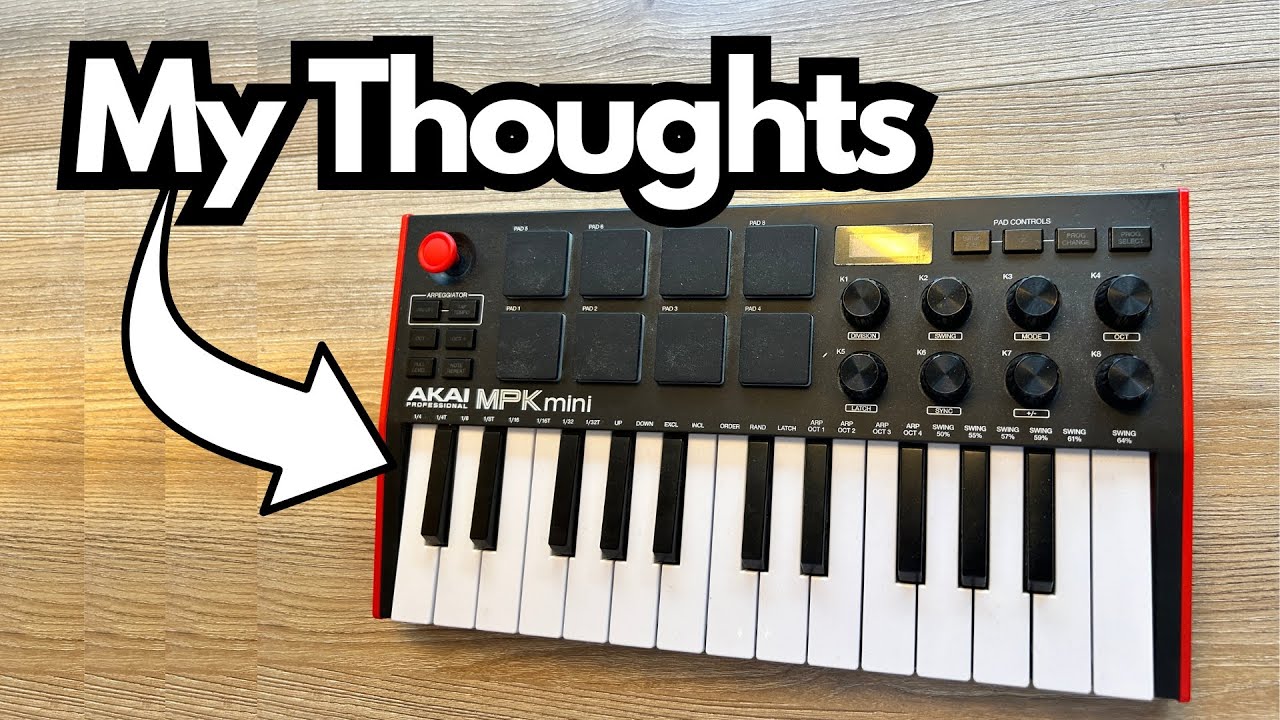
If you’re producing music in a DAW and you want a small, portable MIDI controller that doesn’t feel like a toy, the Akai MPK Mini (on Amazon) is one of the most popular options out there.
I’ve had mine for a couple of years, dragged it around in bags, used it with different DAWs, and it’s still a solid little workhorse.
This post walks through how it’s built, what it does well (and not so well), and who it’s really for.
Overview / First Impressions
The Akai MPK Mini is a compact USB MIDI keyboard with:
- 25 mini keys (velocity-sensitive)
- 8 pads
- 8 endless encoder knobs
- A small digital display
- Pitch control
- Programmable mappings via Akai’s software editor
It’s clearly designed for producers and beatmakers who want something:
- Portable enough to throw in a backpack
- Deep enough to handle drums, keys, and basic DAW control
- Affordable, but not “toy-grade”
Compared to earlier models like the MPK Mini MK2, this version feels noticeably more serious and higher quality.
Build Quality & Design
Physically, the MPK Mini is compact and light, but it doesn’t feel flimsy. The overall construction is solid enough to survive regular travel and day-to-day use.
That said, there is one real-world durability issue I’ve run into:
- Endless encoder knob came off – I used to carry the keyboard around in my bag, and one of the endless encoder knobs actually fell off. I ended up gluing it back on. It’s not the end of the world, but it’s annoying and worth knowing if you plan to travel with it a lot.
Beyond that, the unit has held up well over a couple of years. The keys feel much less “toy-like” than older MPK Minis, and the pads and buttons feel responsive.
The display is simple but well-executed. It’s not flashy, but it’s clear, easy to read, and gives you just enough feedback to know what you’re doing. You can tell Akai actually thought about usability here.
Features & Functions
Programmable Controls
One of the biggest strengths of the MPK Mini is how programmable it is:
- You can use the Akai editor software to map the knobs, pads, and controls to almost anything inside your DAW.
- Presets are available for major DAWs like Logic Pro and FL Studio.
Using the Program Select button, you can quickly switch between saved configurations, like a Logic Pro preset.
Keys & Velocity
The 25 mini keys are:
- Velocity-sensitive – great for more expressive playing, even though they’re small.
- Much more solid than older MPK models, which felt more like toys.
For quick chord ideas, bass lines, or leads, they do the job well.
Pads & Layout Flexibility
One of the coolest things you can do in DAWs like FL Studio or Logic Pro is split your layout:
- Map drums to the pads and/or upper keys,
- While using the lower keys for piano or synth parts.
This lets you play beats and melodies at the same time on a single, compact controller.
Note: This kind of flexible mapping does not work well in GarageBand, which is more limited in terms of MIDI control assignments.
Pitch Control & Pedal Input
- The pitch control works as expected and is responsive.
- There’s also an input for a sustain pedal, which is huge if you’re playing piano-style parts. It makes the MPK Mini feel more like a real instrument and less like a simple trigger box.
How It Sounds / Use Cases
Since the MPK Mini is a MIDI controller, it doesn’t generate sound on its own (unless you get the MPK Mini Play version—more on that in a second). Instead, it controls your virtual instruments inside your DAW.
From a guitarist/producer’s perspective, here’s where it shines:
- Programming drums – The pads and knobs make it easy to tap in grooves and tweak parameters.
- Laying down keys and synths – Great for chords, bass lines, and simple leads when you don’t want a full-size keyboard on your desk.
- Travel and mobile setups – Perfect for working on beats and arrangements on a laptop while you’re away from your main studio.
- Adding MIDI to a guitar-based rig – If you’re mainly a guitarist, this is a compact way to add keys, synths, and drums to your tracks without investing in a big keyboard.
Limitations / Things to Know
1. GarageBand Limitations
While the MPK Mini works fine as a basic MIDI input in GarageBand, you can’t fully take advantage of its programmability:
- GarageBand doesn’t really let you deeply map controls the way Logic or FL Studio does.
- Features like custom splits (drums up top, piano below) are much harder or impossible to do.
If you’re on macOS and want to really use this controller to its full potential, Logic Pro is a much better match than GarageBand.
2. No Built-In Sounds (On This Model)
This version of the MPK Mini does not have:
- Built-in sounds
- A built-in speaker
You always need a DAW or software instrument to hear anything.
In hindsight, I probably would have gone for the Akai MPK Mini Play, which adds a built-in speaker and onboard sounds. That turns it into a standalone jamming tool—you can just pick it up and play without opening a DAW. For quick idea sketching, that’s a big win.
3. Hardware Durability
As mentioned earlier, one of the endless encoder knobs came off with travel. It’s fixable, but if you’re constantly throwing it in a backpack, you might want to:
- Use a padded case
- Be a bit careful with how it’s packed
Final Thoughts
The Akai MPK Mini is a compact, capable, and surprisingly serious MIDI controller for producers and guitarists who want to expand into keys, drums, and synths without dedicating a ton of space or money.
Pros:
- Highly programmable with Akai’s editor
- Works great with Logic Pro, FL Studio, and other full-featured DAWs
- Velocity-sensitive keys that feel much better than older models
- Handy display that keeps things clear and usable
- Sustain pedal input for more expressive playing
Cons:
- Limited functionality in GarageBand
- No built-in sounds or speaker on this version
- One of the encoder knobs came off with regular bag travel
If you mostly work inside a full DAW like Logic or FL Studio and want a portable controller that doesn’t feel like a toy, the MPK Mini is a strong choice. If you want something you can jam on without a computer, consider the MPK Mini Play instead.
Resources & Further Study
If you’re getting into production and want to improve your mixes alongside using a controller like the MPK Mini, there’s a helpful resource available:
- Free Mixing Cheat Sheet & Tips – Head to producersociety.com/free-mixing-cheatsheet to grab a free mixing cheat sheet and get on the email list for additional production tips that aren’t shared elsewhere.
- Producer Society Forum – You can also join the community at forum.producersociety.com. At the time of writing, it’s free to sign up, with plans to expand it into a full course platform in the future.
These can be great complements to a controller like the MPK Mini as you build out your production skills and workflow.