

Loopers can be some of the most inspiring — or most frustrating — pedals on a guitarist’s board. When they’re intuitive, they become a powerful practice tool, songwriting partner, and live performance asset. When they’re clunky, they just get in the way.
The TC Electronic Ditto X2 sits firmly in the “inspiring” camp. It’s one of the easiest, most straightforward loopers you can plug into, and for many guitar players it hits the sweet spot between simplicity and features. Grab one on Amazon if it’s available.
If you’ve tried compact loopers like the Boss RC-1 or RC-5 and found them a bit fiddly underfoot, or you just want a no-nonsense looper that feels natural to use, the Ditto X2 is absolutely worth a look.
Overview / First Impressions
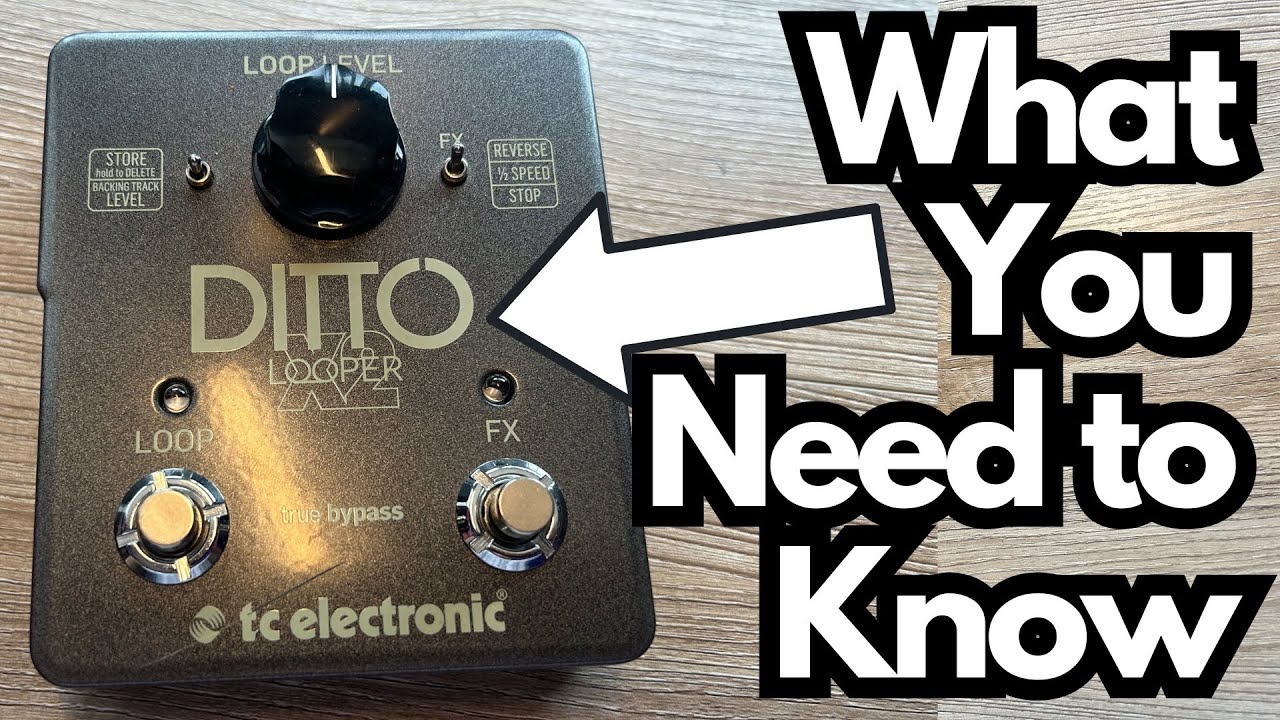
The standout feature of the Ditto X2 is right on the top: two full-sized footswitches.
Where many loopers try to cram record, overdub, stop, and clear onto a single switch with complex tap sequences, the Ditto X2 spreads the workload across two clearly defined controls. That alone makes it feel more like an instrument and less like a piece of menu-driven gear.
At a glance, you get:
- One main Loop footswitch for record, overdub, playback, and clear
- One FX / Stop footswitch for half-speed, reverse, or stop control
- A Level knob for loop volume
- A single slot for a backing track you can load from your computer
- Simple mono/stereo I/O and USB connectivity
It’s not trying to be a full-blown workstation like the Boss RC-5 or RC-500. Instead, it’s a focused, performance-friendly looper with just enough extra functionality to be versatile without getting in your way.
Build Quality & Design
From a guitarist’s perspective, the Ditto X2 feels like a proper pedalboard tool:
- Sturdy enclosure: Solid metal housing that feels roadworthy.
- Full-sized switches: Comfortable spacing and positive, reliable clicks.
- Rubber feet: Double rubber stops on the bottom keep it from sliding around on stage or on a hardwood floor.
- Clean layout: One knob, two switches, a simple toggle — no tiny screens or deep menus.
On the back panel, you’ll find:
- Stereo in/out (mono-compatible) – great for running in stereo rigs or at the end of a pedal chain.
- 9V DC input – standard center-negative power.
- Micro USB port – for loading backing tracks from your computer.
Under the bottom plate, there’s space for two 9V batteries, so you can run the pedal without a power supply if needed. Inside, there’s also a small switch that lets you change the loop workflow order:
- Record → Overdub → Playback
- Record → Playback → Overdub
It’s a subtle but very practical option depending on how you like to build your loops.
Features & Functions
Core Looping Functions
The left footswitch handles all your main looping duties:
- Tap once – Start recording.
- Tap again – Close the loop and start playback.
- Tap again – Start overdubbing.
- Hold – Clear the loop.
It’s intentionally minimal, which is exactly what many guitarists want: you don’t have to remember complex tap sequences or stare at a tiny screen to know what’s happening.
Backing Track Storage
One of the Ditto X2’s standout features is the ability to store a single backing track on the pedal:
- You load the track via the micro USB connection from your computer.
- You can store or delete that track using the pedal itself by holding the appropriate control.
- The pedal can switch between controlling the loop level and the backing track level, giving you basic mix control from the front panel.
It’s not a multi-track library like some loopers with dozens of memory slots, but for many players, one solid backing track slot is enough for practice or a recurring live tune.
FX / Stop Switch: Half-Speed, Reverse, or Stop
The right footswitch is assignable via the small toggle switch:
- Half-Speed – Drops your loop playback to half speed, creating a downshifted, stretched sound.
- Reverse – Plays your loop backward for ambient or experimental textures.
- Stop – Turns the right switch into a dedicated stop button.
That last option is a big deal for performance: you can use the left switch purely for record/overdub, and the right one purely for precision stopping. No double-taps, no timing anxiety — just stomp to stop.
Loop Level Control
The single knob on the top controls the volume of your loops relative to your dry signal and any backing track. It’s simple but essential, especially if you’re layering multiple overdubs and want to keep things balanced.
How It Sounds / Use Cases
From a tonal standpoint, the Ditto X2 is transparent: it doesn’t color your sound or compress your tone in a noticeable way. That makes it ideal at the end of your chain, after your drives, modulation, and time-based effects.
Great Use Cases for Guitarists
- Practice & Fretboard Work
Lay down a simple chord progression and practice scales, arpeggios, or triads over it. The backing track slot is excellent for jamming over a favorite progression or groove. - Songwriting
Quickly capture chord ideas, riffs, and harmonies. The intuitive dual-switch layout makes it easy to build and tweak loops without breaking your flow. - Live Solo Performance
Use the left switch to build layers and the right switch as a dedicated stop. Add half-speed or reverse for dynamic sections or ambient textures. - Ambient & Experimental Playing
Reverse and half-speed modes are particularly fun with reverb and delay in front of the looper, letting you create evolving soundscapes.
If you’ve ever felt limited or frustrated by single-switch loopers, the Ditto X2’s layout is immediately more musical and forgiving.
Limitations / Things to Know
The Ditto X2 is intentionally streamlined, and that simplicity comes with a few trade-offs:
- Only one backing track slot
You can store a single backing track at a time. If you’re used to loopers like the Boss RC-5 with up to 99 memory locations, this will feel limited. For many players, though, one slot is enough for practice or a signature live tune. - No MIDI control
There’s no MIDI in/out, so you can’t sync it with external clocks, drum machines, or other MIDI devices. If you need tempo sync or remote control from a MIDI rig, something like the RC-5 or higher-end loopers will serve you better. - No built-in drums or rhythm patterns
Unlike some loopers that double as mini rhythm stations, the Ditto X2 is strictly about looping and basic FX — no drum patterns, no metronome, no time signature editing. - No tap tempo
Since there are no internal rhythms, there’s no tap tempo function. Your timing is purely based on your foot and your playing.
If you want a looper that’s also a rhythm workstation and MIDI hub, you’ll outgrow the Ditto X2. But if you want something that just loops cleanly and intuitively, these “limitations” are part of what keeps it simple and fast.
Final Thoughts
From a guitarist’s perspective, the TC Electronic Ditto X2 hits a really appealing middle ground:
- Far more usable and performance-friendly than tiny single-switch loopers.
- Much simpler and more immediate than feature-packed loop stations with menus, screens, and MIDI.
- Solid build, stereo capability, backing track support, and musical half-speed/reverse options.
Its main drawbacks are the single backing track slot and lack of MIDI or drum features. If you absolutely need those, a pedal like the Boss RC-5 will make more sense.
But if your priority is a hands-on, intuitive looping experience that feels natural underfoot, the Ditto X2 is one of the best bang-for-buck looper pedals you can buy — and for many players, it’s all the looper they’ll ever need.
Resources & Further Study
If you’re using a looper to improve your playing, especially your fretboard knowledge and improvisation, structured practice material can help a lot.
- Fretboard Memorization Cheat Sheet – Available at travelingguitarist.com, this resource lays out major and minor triads in every key. It’s designed to help you:
- Memorize the notes on the fretboard
- Understand the triadic foundation of chords and harmony
- Improvise more confidently over your own loops
- Traveling Guitarist Forum – At forum.travelingguitarist.com, you can connect with other players to talk gear, looping strategies, practice routines, and all things guitar.
Pairing a straightforward looper like the Ditto X2 with focused fretboard study is a powerful way to turn your practice time into real musical progress.