

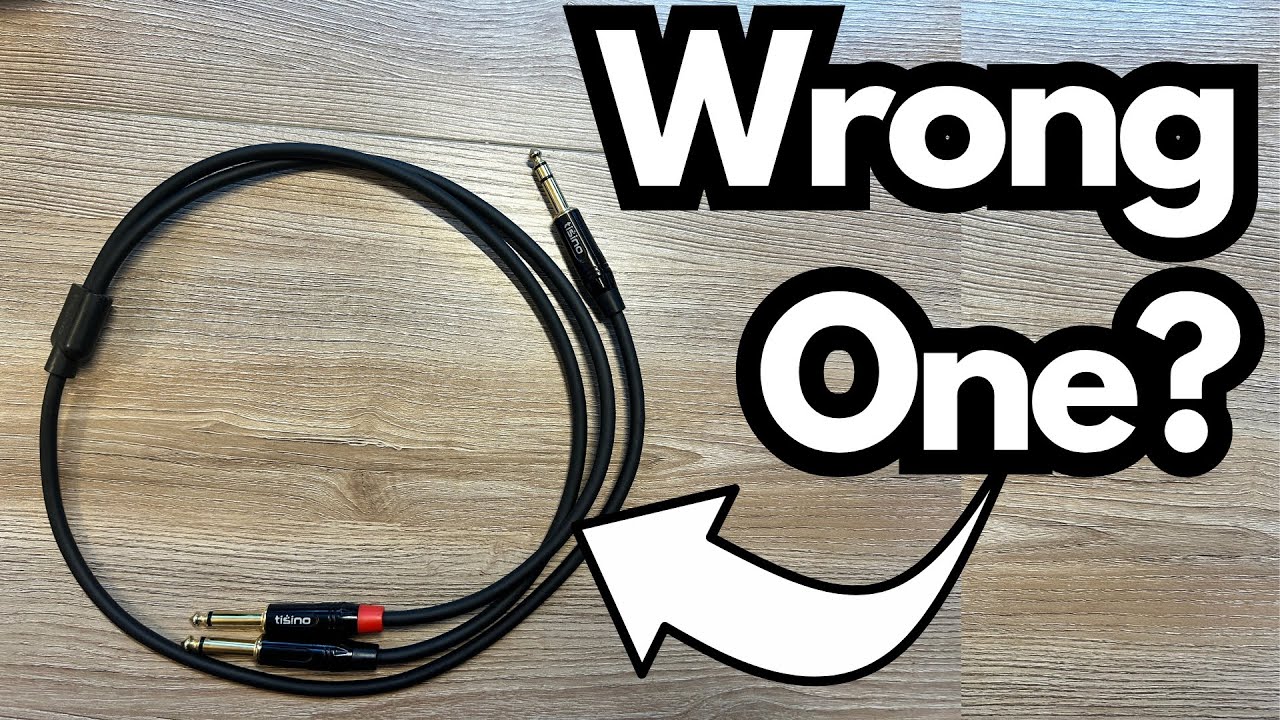
If you’ve just picked up a Tosino “stereo” cable (or any TRS splitter) to run stereo from your pedalboard into an audio interface and it’s not behaving, you’re not alone.
A lot of guitarists run into the same confusion: only one side works, the other is dead, and it’s not clear whether the cable, the pedal, or the setup is to blame. You can grab one here on Amazon.
This post breaks down what’s likely going on, what these cables are actually designed for, and how to get a proper stereo setup working from a guitarist’s perspective.
Overview / First Impressions
Here’s the typical situation:
- You have a pedal with a stereo output (TRS or dual mono).
- You’re using a Tosino cable to split that signal.
- You’re trying to feed two pedals and then go left and right into your audio interface.
- Only one side (for example, the left channel) is working; the other side is dead.
On the surface, it feels like the cable is faulty or the pedal is broken. But in most cases, the real issue is how the cable is wired versus what your pedal actually expects.
Build Quality & Design (What This Cable Probably Is)
Most Tosino “stereo” cables in this category fall into one of the following types:
1. TRS to Dual TS Insert Cable
- One end: TRS (Tip–Ring–Sleeve)
- Other end: two mono TS (Tip–Sleeve) plugs, often labeled Tip/Ring or Left/Right
- Commonly used as an insert cable (for example, mixer insert send/return), not true stereo in/out for pedals
2. TRS to TRS “Stereo” Cable
- Both ends: TRS
- Meant to carry a stereo signal from one stereo jack to another (for example, headphones or audio devices)
- Not designed to split a stereo signal into separate mono jacks
For guitar use, the confusion usually comes from assuming any TRS jack equals a stereo output, and any “stereo” cable will split it correctly. That’s not always true.
Features & Functions: TRS, Stereo, and Pedal Outputs
1. TRS Doesn’t Always Mean Stereo
TRS (Tip–Ring–Sleeve) can be wired for several different purposes:
- Stereo (Tip = Left, Ring = Right, Sleeve = Ground)
- Balanced mono (Tip = hot, Ring = cold, Sleeve = ground)
- Insert (Tip = send, Ring = return)
- Expression/control (for some pedals)
You need to know what your specific pedal’s output jack is meant to do. The manual will usually say something like:
- “Stereo out (TRS)” → You can split to left/right.
- “Balanced out (TRS)” → Not meant for stereo splitting.
- “Insert jack” → Not a stereo output at all.
2. Stereo Outputs on Pedals: Two Common Types
Pedals usually handle stereo in one of two ways:
Type 1: Two Separate Mono Jacks
- L/Mono and R, both TS jacks
- Use two regular mono cables into two interface inputs
Type 2: Single TRS Jack That Carries Stereo
- One TRS jack with Tip = Left, Ring = Right
- Requires a TRS to dual TS “Y” cable specifically wired for stereo (not just any TRS cable)
If your Tosino cable is not the right type (or is wired for insert use), you’ll typically see behavior like:
- One side (usually Tip) works.
- The other side (Ring) is silent or behaves unpredictably.
How It Sounds / Use Cases (When It Does Work)
When the correct cable is used with a true stereo TRS output, you should be able to:
- Send Left to one pedal or interface input.
- Send Right to another pedal or interface input.
- Hear stereo effects (chorus, delay, reverb, trem, etc.) properly separated.
An ideal setup looks like this:
- Pedal with TRS stereo out →
- TRS to dual TS stereo splitter (clearly labeled L/R) →
- Left TS into one pedal or interface input, Right TS into another.
If your current Tosino cable only passes one side (for example, only the left works), it’s very likely that:
- The cable is wired for insert use, not stereo.
- Or your pedal’s output isn’t actually TRS stereo in the way you expect.
Limitations / Things to Know
1. Cable Type Mismatch
Here’s where most stereo issues start:
- A TRS-to-TRS cable won’t split stereo into two mono paths.
- An insert cable (TRS to two TS) won’t always map correctly to stereo left/right.
- You specifically need a TRS stereo to dual TS L/R splitter.
Look for wording like:
- “TRS Stereo to 2 x TS Mono, Left/Right”
- “Headphone splitter Y-cable (TRS to dual TS) for stereo breakout”
Avoid cables marketed primarily as insert cables for mixers unless you can confirm the wiring.
2. Pedal Output Confusion
Your pedal might:
- Have two separate mono outs (in which case, don’t use TRS at all—use two mono cables).
- Use the TRS jack as a balanced mono output.
- Use that jack for expression or control, not audio.
Check the pedal’s manual or manufacturer’s site and confirm whether it says:
- “TRS stereo out”
- “Balanced TRS out”
- “Insert / control / expression”
3. Audio Interface Inputs
Most audio interface inputs are mono:
- You should plug one mono TS cable per input.
- Don’t try to feed a single TRS stereo cable directly into one input and expect stereo.
How to Fix Your Setup
To get the rig you described working properly:
- Confirm the pedal’s output type
If it has L/Mono and R jacks:
– Use two regular mono TS cables, one from each jack into two interface inputs.
If it has a single TRS stereo out:
– Buy a TRS stereo to dual TS (L/R) splitter cable specifically designed for stereo. - Stop using the wrong cable for this job
If your Tosino cable is an insert cable or TRS-to-TRS, it’s probably not the right tool for stereo splitting. - Test each side separately
Once you have the right cable, test Left out into your interface, then Right out, to be sure both channels work.
Final Thoughts
There’s a good chance nothing is actually broken—you’re just running into the messy reality that TRS doesn’t always mean stereo, and not all “stereo” or Tosino-branded cables are wired for the job you’re trying to do.
From a guitarist’s point of view, if you want true stereo into your interface, the simplest reliable methods are:
- Two mono outputs → two mono inputs via standard TS cables, or
- TRS stereo out → proper TRS-to-dual-TS stereo splitter → two mono inputs.
Once the cable type matches what your pedal is designed for, both left and right channels should come to life, and you’ll actually hear the stereo field you paid for.
Resources
To sort this out quickly, check:
- Your pedal’s user manual for how the output jack is wired (TRS stereo, balanced, insert, etc.).
- Your audio interface manual for how its inputs expect to receive signals.
- Product pages for TRS stereo to dual TS L/R splitter cables (often sold as “stereo breakout” or “Y” cables), and avoid ones labeled mainly as insert unless you confirm the wiring.