

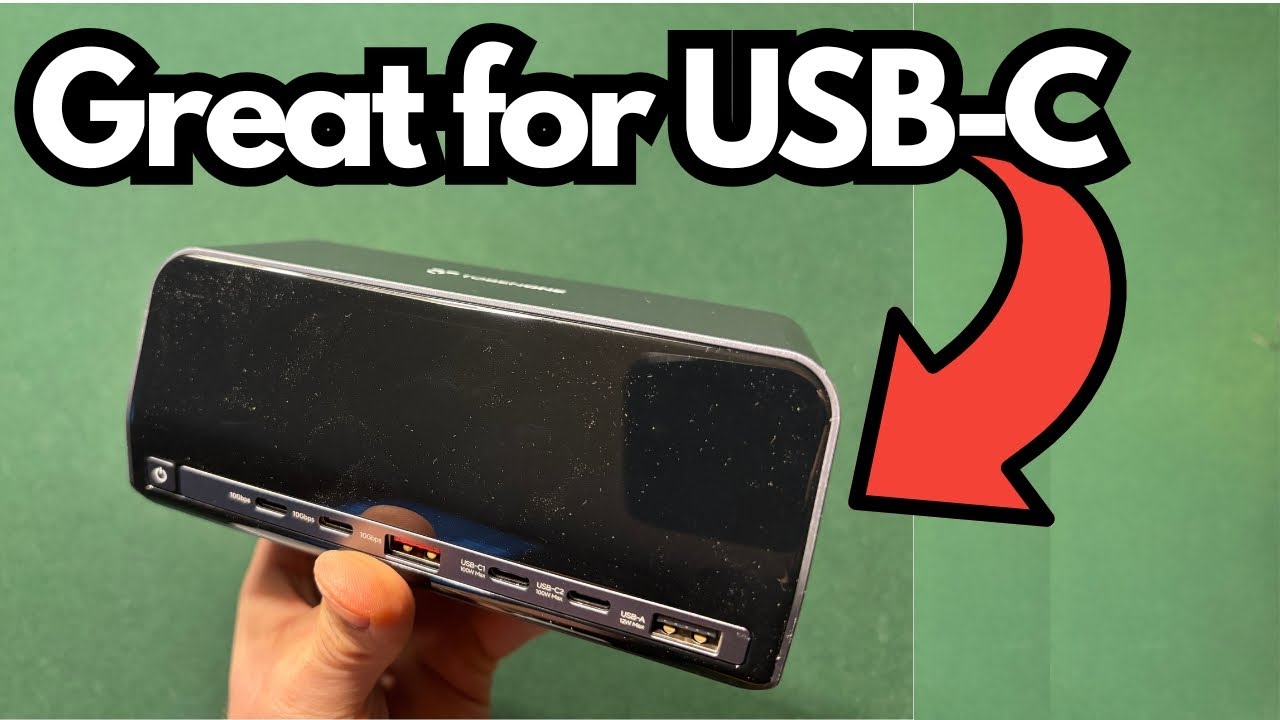
If you’re running a modern laptop or tablet with USB‑C, you’ve probably hit the “one port, too many devices” wall. That’s where a good docking station becomes essential—especially if you’re juggling external drives, displays, Ethernet, and peripherals all at once.
The Tolben 1 USB‑C Docking Station aims to be a compact, all‑in‑one hub that adds multiple high‑speed USB‑C and USB‑A ports, dual HDMI, and Ethernet to your setup, while also powering your device.
It’s designed for people who want a clean, simple, plug‑and‑play solution that just works—whether you’re on PC, Mac, or anything else that supports USB‑C.
You can grab it here on Amazon if you’re interested.
Overview / First Impressions
The standout features of the Tolben 1 dock are:
- Multiple high‑powered USB‑C ports (around four total)
- Several USB‑A ports (about three)
- Dual HDMI outputs for external displays
- Ethernet for wired network connections
- A front display that shows power/activity status
- External power supply so it can power your devices
- Plug‑and‑play: no drivers required
Out of the box, you get:
- The docking station itself
- A replaceable power cable (so if it fails, you can easily swap it)
It’s compact and lightweight, making it easy to drop into a bag or keep tucked neatly on your desk.
Build Quality & Design
From a design standpoint, the Tolben 1 focuses on practicality:
- Small footprint – easy to place behind a monitor or beside a laptop
- Clear rear layout – most of the I/O lives on the back, keeping cables out of your way
- Status display – a small display on the unit shows that the ports are active and working
- Dedicated power button – lets you turn the dock on or off without unplugging it
Despite its size, it’s packed with ports and clearly aimed at users who need a serious connectivity upgrade from a single USB‑C port.
Ports, Features & Functions
Here’s what you get in terms of connectivity and functionality.
Rear I/O
On the back of the unit, you’ll find:
- 2 × HDMI ports
- For connecting one or two external monitors.
- 1 × Ethernet port
- For a stable, wired internet connection.
- Multiple USB ports:
- USB‑C ports (around 4 total)
- High‑power, high‑speed data transfer.
- USB‑A ports (about 3 total)
- For legacy devices like older drives, keyboards, mice, etc.
- USB‑C ports (around 4 total)
- Power input for the included power cable.
Front / Side Controls
- Power button
- Lets you shut the dock off without having to disconnect the power brick.
- Status display
- Shows that the dock and ports are active and functioning.
Power & Compatibility
- External power supply
- The dock is not bus‑powered; it relies on the included power cable.
- This allows it to deliver more power to connected devices and run multiple ports at once.
- Cross‑platform support
- Works with:
- Windows PCs
- Macs
- Any other device that supports USB‑C for data and display
- Works with:
No proprietary software, no configuration utilities—just plug it in and start using it.
Setup & Everyday Use
Getting the Tolben 1 running is straightforward:
- Unpack the dock and power cable.
- Connect the power cable to the back of the dock.
- Plug the power cable into the wall or a surge protector.
- Connect the dock to your device via USB‑C.
- Optionally:
- Plug in monitors via HDMI.
- Connect Ethernet.
- Add USB‑C and USB‑A peripherals (drives, hubs, audio interfaces, etc.).
Once everything’s connected, the status display lights up to show that the ports are active. From there, you use it like any normal port on your computer—no drivers, no extra setup.
In use, the dock:
- Handles multiple USB‑C devices without issue
- Delivers fast data transfer speeds
- Keeps everything running smoothly without needing any tweaks or troubleshooting
How It Fits Into a Modern Setup
The Tolben 1 is especially useful if you:
- Use lots of USB‑C devices (external SSDs, interfaces, phones, tablets, etc.)
- Need more ports than your laptop provides
- Want to run dual external displays via HDMI
- Prefer a wired Ethernet connection for stability and speed
- Want a single hub that stays on your desk so you can connect/disconnect your laptop with one cable
Because it’s plug‑and‑play and platform‑agnostic, it’s ideal for:
- Home offices
- Shared workspaces
- People who swap between a work laptop and a personal machine
- Anyone who hates constantly plugging and unplugging multiple adapters
Limitations / Things to Know
No device is perfect, and there are a couple of points to be aware of:
- Requires external power
- This is both a strength and a drawback:
- Strength: more power for your devices, more stable performance.
- Drawback: you must have it plugged into the wall—no purely bus‑powered operation.
- Not an ultra‑minimal dongle
- If you just want a tiny, single‑cable USB‑C to HDMI adapter, this is more than you need. It’s designed as a full docking station, not a pocket dongle.
That said, in actual use, there were no functional complaints:
- No driver issues
- No connection problems
- No instability reported
It simply works as intended.
Final Thoughts
The Tolben 1 USB‑C Docking Station is a solid choice if you need:
- Multiple high‑speed USB‑C ports
- Extra USB‑A connectivity
- Dual HDMI outputs
- Ethernet
- A compact, plug‑and‑play hub that works on PC and Mac
The only real trade‑off is that it must be powered, but that’s also what enables it to handle several devices reliably. If you’re building a clean, modern desk setup around a USB‑C laptop or tablet and want a single, simple hub to handle everything, this dock is an easy recommendation.