

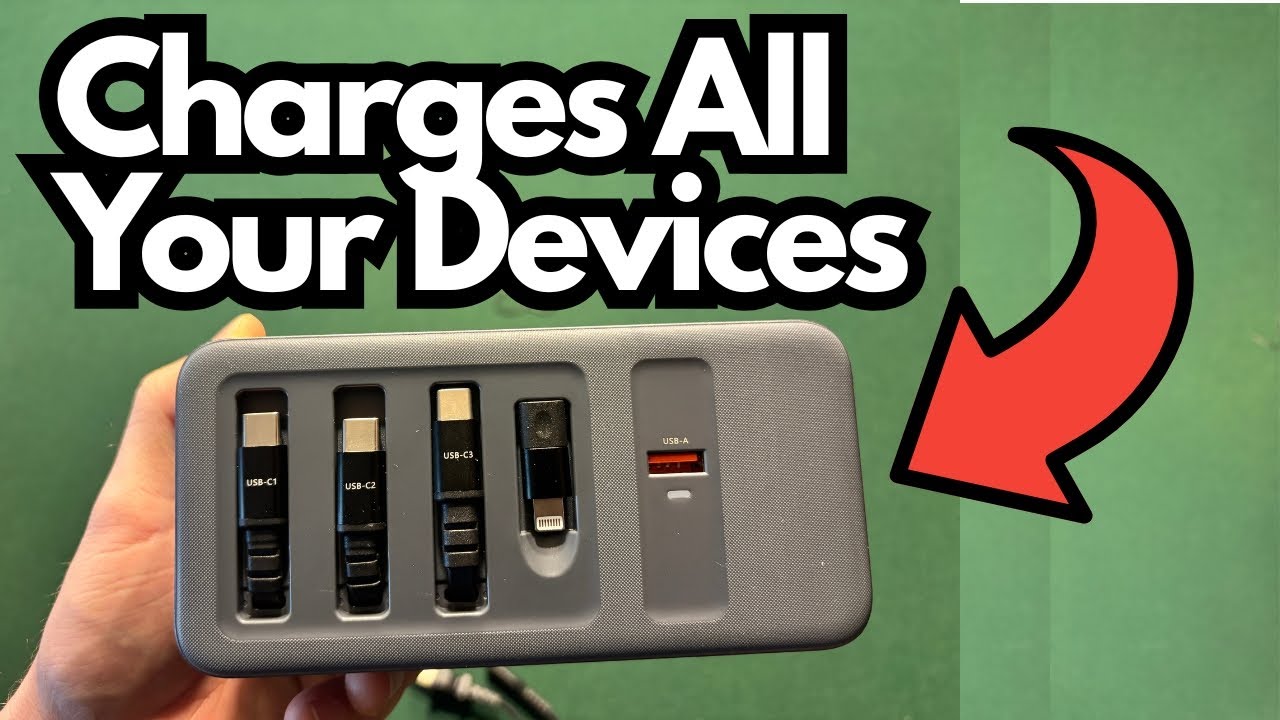
If you’re juggling a MacBook, iPad, iPhone, and a few other gadgets, plugging and unplugging wall bricks gets old fast. That’s where a high‑wattage desktop charger like the TobenOne Charging Station really starts to make sense.
This compact power hub is designed to sit on your desk or nightstand and replace multiple separate chargers with one tidy block. It’s especially useful if you’re running a laptop and tablet all day, or you travel with a small studio of devices and want a single, reliable power source.
Overview / First Impressions
The TobenOne Charging Station is essentially a high‑power desktop charging block with multiple ports and built‑in cables. It’s not a tiny travel cube; it’s meant to handle bigger devices and several of them at once.
Key idea: one power brick, multiple high‑wattage outputs, and no extra cables needed for the main ports.
Who It’s For
- People who use:
- A MacBook (or other USB‑C laptop)
- An iPad or other tablet
- An iPhone (USB‑C or Lightning)
- Older USB‑A devices
- Anyone who wants:
- Fewer wall adapters
- A cleaner desk setup
- A single “charging base” for daily use
Ports, Power & Layout
The unit gives you multiple ports with different power ratings so you can charge several devices at once without constantly swapping cables.
Port Breakdown
- USB‑C1: up to 100W
- USB‑C2: up to 100W
- USB‑C3: up to 65W
- USB‑A: up to 18W
Total combined output is around 165W, which is enough to run a laptop plus multiple mobile devices.
There’s also a Thunderbolt‑type connector that can be adapted to USB‑C, giving you more flexibility with modern devices.
Built‑In Cables
One of the most useful aspects is that the main charging cables are built into the unit. That means:
- No hunting for separate USB‑C cables
- Less cable clutter on the desk
- Faster, simpler setup: plug in the block, connect your devices, done
If you’re still using an older iPhone, there’s an adapter for a Lightning port, so you can hook that up as well.
How Power Is Shared Between Ports
Because the station can deliver up to 165W total, the wattage each device receives depends on how many ports you’re using at the same time.
Some examples:
Single‑Device Use
- C1: up to 100W
- C2: up to 100W
- C3: up to 65W
- USB‑A: up to 18W
Two‑Port Charging (Examples From the Unit’s Behavior)
- C1 + C2: 65W + 30W (good for a laptop plus a lower‑demand device)
- C1 + C3: 100W + 65W (great for a MacBook Pro plus an iPad Pro)
The takeaway: if you’re charging multiple high‑draw devices, the station intelligently divides power. Your laptop will still get plenty of juice, but you won’t always see the maximum rating on every port at the same time.
Real‑World Use Cases
Here’s what it looks like in a typical setup:
- MacBook on one of the 100W USB‑C ports
- iPad Pro on another USB‑C port (65W is more than enough)
- Older iPhone on the USB‑A port via its standard cable
- One more device (e.g., camera, second phone, or accessory) on the remaining USB‑C
In this configuration, the station:
- Charges a laptop at full working speed
- Keeps your tablet topped up
- Handles an older phone or accessory via USB‑A
- Still has room for one more modern device
Because the cables are already attached to the unit for the main ports, it really does feel like a “drop everything here and charge” solution.
Why This Kind of Charger Matters
If you’re deep into the Apple ecosystem (MacBook + iPad + iPhone), or you simply own several USB‑C devices, this kind of hub:
- Replaces multiple bricks with one device
- Reduces cable mess on your desk or nightstand
- Simplifies travel: one block in the bag instead of three or four
- Supports modern standards (USB‑C, Thunderbolt‑type connection) while still accommodating older USB‑A gear
Limitations / Things to Know
A few practical points to keep in mind:
- Not a pocket charger
It’s more of a desktop or bedside station than a super‑portable cube. - Power is shared
When you plug in multiple high‑draw devices, each port’s wattage can drop from its maximum. This is normal, but worth understanding if you expect full 100W on multiple ports simultaneously. - USB‑A is lower power
At 18W, it’s fine for phones, older devices, and accessories, but not for anything that needs serious wattage. - Older iPhones need the adapter
Modern iPhones are USB‑C, but if you’re still on Lightning, you’ll use the included adapter to make it work with the built‑in cabling.
Final Thoughts
The TobenOne Charging Station is a solid option if you’re tired of juggling multiple chargers and cables. With up to 165W of total output, three USB‑C ports, a USB‑A port, and built‑in cabling, it’s well‑suited to powering a MacBook, iPad, phone, and another device all from a single, tidy block.
If your desk or nightstand is a tangle of separate wall warts and random cables, this kind of all‑in‑one station can make your setup cleaner, simpler, and a lot easier to live with day‑to‑day.