

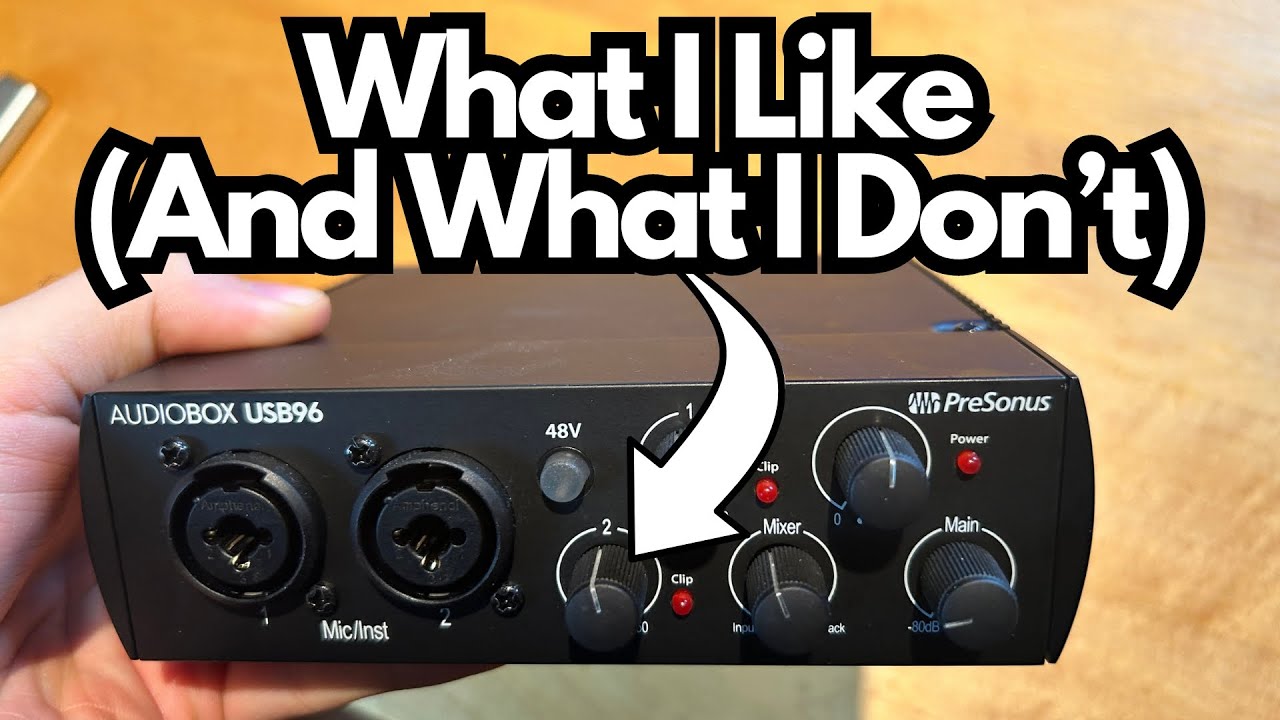
If you’re a guitarist looking for a simple, reliable audio interface for home recording or travel, the PreSonus AudioBox USB 96 is one of those boxes that quietly gets the job done.
It’s inexpensive, compact, and gives you everything you need to track guitars, vocals, and MIDI instruments without a lot of fuss.
I picked this one up specifically for home visits with family—something small I could throw in a bag and trust to work when inspiration hits.
You can grab it here on Amazon if you’re interested.
I already own several interfaces, and at this point I’ve learned that once you reach a certain price and quality tier, most of them sound very similar. The AudioBox USB 96 (on Amazon) fits right into that “good enough for pretty much anyone” category.
Let’s break down what it does well, where it falls short, and who it’s really for.
Overview / First Impressions
The AudioBox USB 96 is a 2-in/2-out USB audio interface aimed at home studio users, singer-songwriters, and guitarists who want straightforward recording without a steep learning curve.
From a sound quality perspective, it holds its own against popular competitors like the Focusrite Scarlett 2i2. You’re not going to hear obvious distortion, noise, or any “cheap” character in normal use. For tracking guitars, vocals, and basic demo work, it absolutely does the job.
It’s not a flashy interface. It’s more of a workhorse: plug it in, set your levels, and record.
Build Quality & Design
The chassis itself is solid. It’s made from aluminum, which gives it a sturdy feel and some confidence that it’ll survive being tossed into a backpack.
However, there are a couple of design quirks worth knowing about:
- Knobs:
The gain and level knobs are where the budget nature of the unit shows. They work, but they feel a bit loose and shaky compared to something like a Scarlett. They’re not precision-feeling controls, and they don’t inspire as much confidence if you’re used to higher-end gear. - Ports & Connectors:
The ports are fine, but again, not premium. Everything functions as expected, but you can tell corners were cut to hit the price point. - No Rubber Feet:
There’s no rubber on the bottom of the unit. That sounds minor, but if you’ve got a heavy guitar cable or XLR plugged in, the weight of the cable can tug the interface and slide it around on your desk.
The fix is simple—buy some cheap stick-on rubber feet or pads and you’re done—but it’s something PreSonus really should have included by default.
Physically, it’s compact and easy to place on a small desk or next to a laptop, which is perfect for home or travel setups.
Features & Functions
From a guitarist’s perspective, this interface gives you the essentials.
Front Panel
- 2 Combo Inputs (XLR / ¼” TRS)
Two combo jacks for microphones, guitars, and line-level sources. You can record a vocal and a guitar at the same time, or a stereo source like a keyboard. - Phantom Power (48V)
There’s a phantom power switch for running condenser microphones. Handy if you’re recording vocals or miking an acoustic guitar with a condenser. - Clip Indicators
Each channel has clipping LEDs so you can see when your input level is too hot. This is crucial when recording electric guitar or aggressive vocals—just back off your gain until the light doesn’t flash red. - Headphone Output
A dedicated headphone jack on the front. You’ll need a ¼” TRS adapter if your headphones use the smaller 1/8″ plug.
If you want more than one headphone output, you can use a headphone splitter from this jack or route from the rear outputs to a headphone amp.
Rear Panel
- MIDI In/Out
This is a standout feature for a budget interface. You can plug in older keyboards, sound modules, or MIDI controllers and integrate them with your DAW.
That’s great if you’ve got an older electric piano or keyboard you still love and want to keep using. - Main Outputs (for Speakers/Monitors)
Standard line outputs to hook up studio monitors or powered speakers. - USB Connection
It connects to your computer via USB. It’s not USB-C, which is a bit dated now, but functionally it works just fine. You’ll just be using the older USB-A style cable.
How It Sounds / Use Cases
In practical use, the AudioBox USB 96 sounds comparable to other popular budget and midrange interfaces:
- Guitar Tracking:
Plugging a guitar straight into the interface works well for recording DI tracks into amp sims. There’s no obvious noise or tone-suck in normal conditions. If you’re using plugins like Neural DSP, AmpliTube, Helix Native, or similar, this interface will absolutely get you there. - Vocals & Acoustic Instruments:
With a decent mic and proper gain staging, you can capture clean vocals and acoustic guitar. It’s not a “character” preamp; it’s more neutral and transparent, which is exactly what you want at this level. - MIDI-Based Production:
If you’re working with virtual instruments, the MIDI I/O is a big plus. You can keep using older keyboards or modules without needing a separate MIDI interface.
Realistically, once you’re in this price/quality tier, the differences in sound quality between brands are subtle. If you’re using decent monitors or headphones and you gain-stage properly, you’re going to get professional-sounding results.
Limitations / Things to Know
A few things to keep in mind before you buy:
- Knob Quality:
Functional but not inspiring. If you’re picky about tactile feel, this might bug you. - No Rubber Feet:
The unit can slide around when cables tug on it. Easy to fix with stick-on rubber feet, but it’s an extra step. - Older USB Standard:
No USB-C. Not a dealbreaker, but it feels a bit behind the times if the rest of your setup has moved on. - Not a “Flagship” Interface:
This is a practical, budget-friendly tool. You don’t get high-end metering, tons of I/O, or fancy onboard DSP. It’s meant to be simple and effective, not luxurious.
Final Thoughts
The PreSonus AudioBox USB 96 is a solid, no-nonsense interface for guitarists and home producers who just need something that works:
- Sound quality is more than good enough for serious home recording.
- It stacks up well against popular options like the Scarlett 2i2.
- MIDI I/O is a nice bonus, especially if you’ve got older keyboards or sound modules.
- The build is sturdy, but the knobs and lack of rubber feet remind you it’s a budget box.
If you’re looking for a reliable interface to leave at a secondary location (like a family home), toss in a backpack, or use as your first recording interface, this is a perfectly good choice. Add some rubber feet, plug in your guitar, and you’re ready to go.
Resources & Further Study
If you’re getting into recording and mixing with interfaces like the AudioBox USB 96, you may find these kinds of resources helpful:
- Mixing Cheat Sheets & Tips:
Practical guides that walk you through gain staging, EQ, compression, and basic mixing workflows can dramatically improve the results you get from even a simple interface. - Recording Forums & Communities:
Online forums dedicated to home recording and production are great places to ask questions about setup, latency, guitar tones, and DAW configuration. Engaging with a community can speed up your learning curve and help you get the most from your interface.