

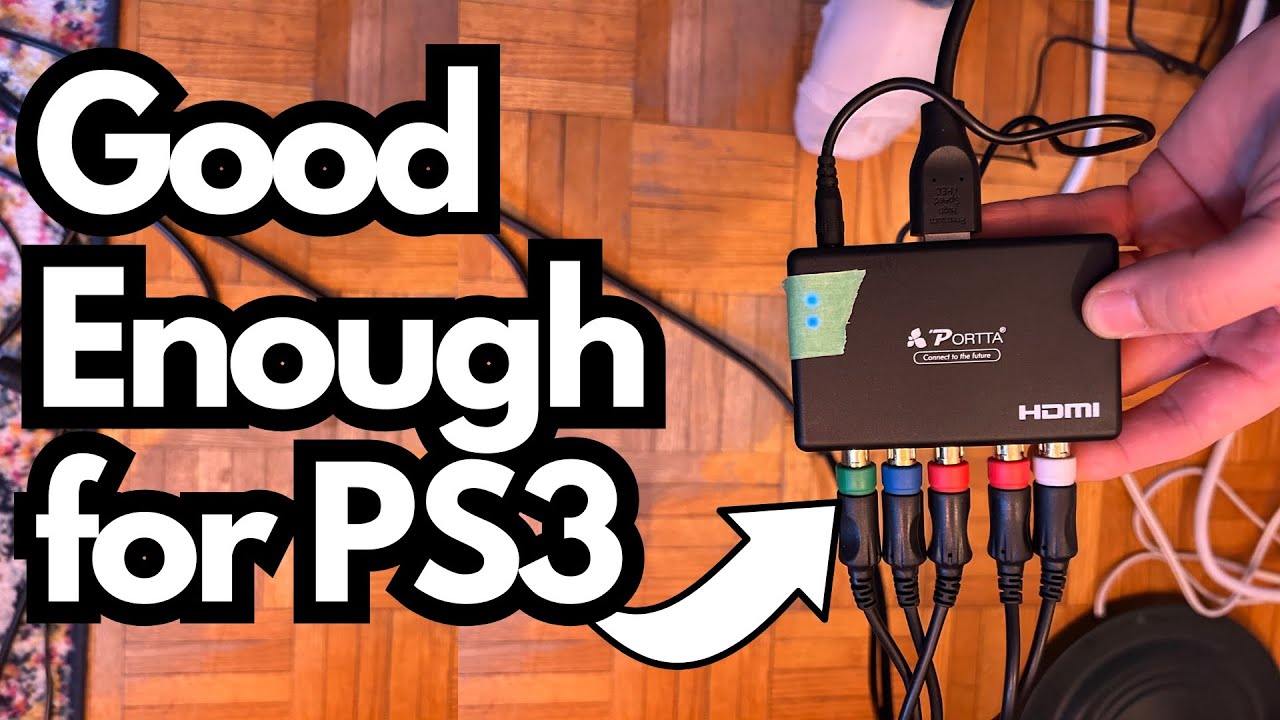
If you’ve been told you need a pricey upscaler like a RetroTINK just to make your PlayStation 3 look decent on a modern TV, this is for you. There’s a much cheaper, simpler option that works surprisingly well: the PORTH (often sold as a generic HDMI converter).
I’ve been using a couple of these units in different locations, and they’ve handled PS3 on modern displays without drama, lag, or complicated setup. You can grab it here on Amazon if you’re interested.
Overview / First Impressions
The PORTH HDMI converter is one of those small, inexpensive boxes you plug into the back of your TV. It takes your console’s output and sends it over HDMI so you can use a modern flat‑screen without digging out an old CRT or dropping serious money on a boutique scaler.
I keep one at my parents’ place and one in my studio. Both have been plug‑and‑play:
- Connect it to the TV’s HDMI input
- Plug your console into the converter
- Power it up
- Start playing
No menus, no firmware, no tuning—just a straightforward connection.
Build Quality & Design
Physically, the PORTH is simple and functional:
- Compact plastic housing
- HDMI port on one side for the TV
- Inputs for your console on the other
- A couple of bright blue indicator LEDs
Those LEDs are very bright—bright enough to be annoying in a dim studio. I ended up putting a strip of green tape over them just to tone them down. It doesn’t affect performance at all, but if your setup is in a dark room, you’ll probably want to do something similar.
Beyond that, the build is what you’d expect at this price: not premium, but solid enough to leave plugged in behind a TV without worry.
Features & Functions
This isn’t a feature-packed device, and that’s part of its appeal. Here’s what it does:
- Converts your console’s output to HDMI
- Sends that signal to a modern TV
- Requires no configuration or software
There are no fancy scaling modes, filters, or retro presets. It’s designed to get your console on a modern screen quickly and cheaply, not to be a tweaker’s dream box.
How It Looks & Performs on PS3
The big question: does PS3 actually look good on a modern TV with this thing?
In my experience:
- PS3 games look great on a modern flat‑screen using this converter
- I don’t see a meaningful difference that would justify a much more expensive solution for this particular console
- For normal play—single‑player, casual multiplayer, etc.—it absolutely does the job
I originally assumed I’d need a high-end scaler to make PS3 usable on a current TV, especially after reading a lot of online advice pushing more expensive hardware. In practice, that just hasn’t been true for me.
If your goal is simply: “I want to plug my PS3 into my modern TV and have it look good,” the PORTH handles that easily.
Latency & Responsiveness
Input lag is another common concern with cheap converters.
From my real-world use:
- I’ve noticed no latency issues using the PORTH with PS3
- Controls feel responsive and natural
- I’ve had no problems in regular gameplay
Some people online do report latency with similar devices. That doesn’t mean it’s impossible—you might run into it depending on your specific TV and settings—but I haven’t experienced any problems across the two units I own.
If you’re extremely sensitive to lag or playing ultra-competitive titles, you might still want to test your exact setup. But for most players, this converter should feel just fine.
Limitations / Things to Know
A few practical points to keep in mind:
- Not a premium scaler
This isn’t trying to compete with high-end retro hardware. It’s a simple converter. - Very bright LEDs
Expect to cover them with tape if your setup is in a dark room. - No advanced options
No scanlines, no aspect ratio controls, no fancy processing—just conversion. - Your mileage may vary on lag
While I’ve had no latency issues, some users of similar devices have reported them. TV “Game Mode” settings and other processing can also affect this.
Final Thoughts
If you’ve been scared into thinking you must buy an expensive upscaler just to run a PS3 on a modern TV, the PORTH HDMI converter is a refreshing reality check.
- It’s cheap
- It’s simple
- It works
- PS3 games look great and feel responsive in normal use
Unless you’re deep into high-end retro video processing or need advanced tweaking, this little box is more than enough to bring your PS3 into the modern TV world without draining your wallet.