

If you’re a guitarist who’s getting deeper into recording, beat-making, or home production, at some point you start looking beyond just an audio interface and a DAW. You want a way to tap in drums, trigger samples, and control your mixes without mousing around all day.
That’s where a pad controller like the Akai MPD226 (on Amazon) comes in.
I’ve had the MPD226 for about four years now, and it still works as well as the day I unboxed it. This isn’t a brand-new product, but that’s actually a good thing: the bugs are known, the strengths are clear, and the price is usually reasonable on the used market.
This review is written from a guitarist/producer’s perspective: someone who plays guitar first, but wants solid tools for programming drums, controlling the DAW, and speeding up the creative process.
Overview / First Impressions
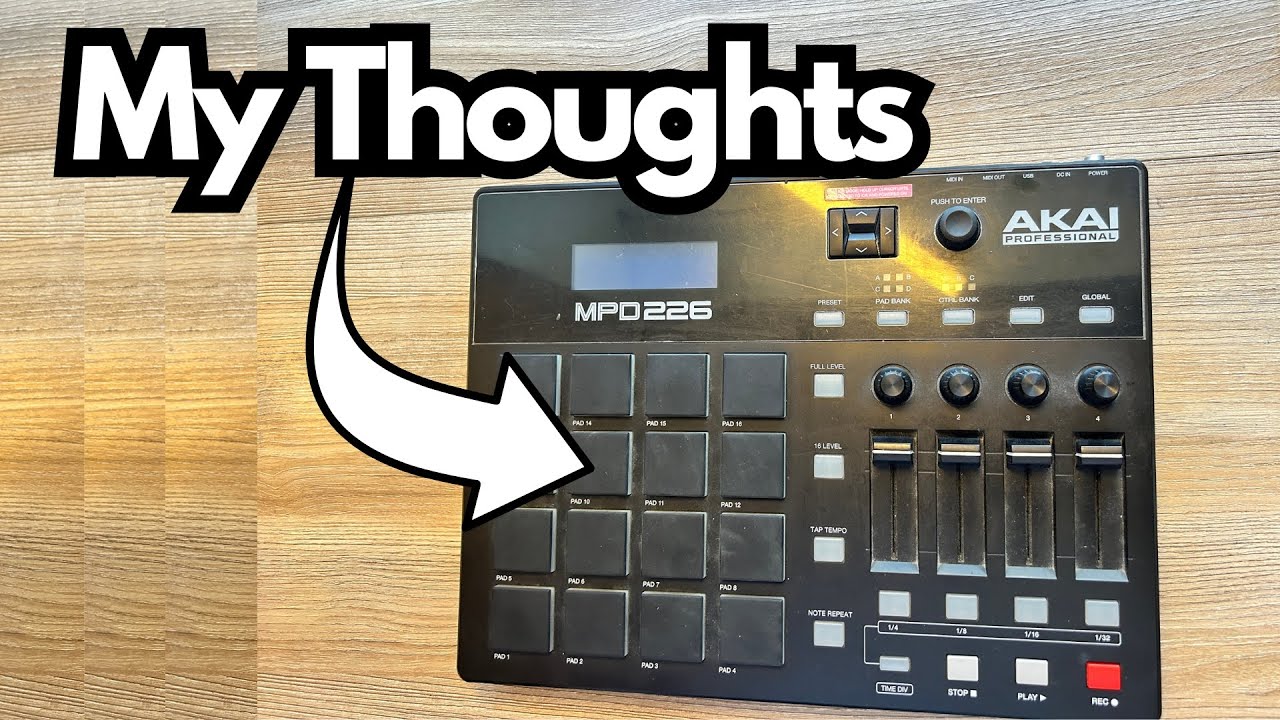
The Akai MPD226 is a USB MIDI pad controller designed primarily for beat-making and DAW control. Think of it as a compact, dedicated drum and performance surface:
- 16 RGB-backlit pads
- Multiple pad banks (far more than just 16 sounds)
- Faders and knobs for DAW control
- Preset system for different software (FL Studio, Logic, etc.)
- Extras like note repeat, tap tempo, and full-level
From a guitarist’s standpoint, this is a way to:
- Tap in drum grooves instead of clicking them in with a mouse
- Trigger loops, samples, or backing tracks
- Control DAW volume and parameters while your hands are off the guitar
It’s plug-and-play over USB and works with most major DAWs. I’ve used it with GarageBand, though support there is limited (more on that later).
Build Quality & Design
After four years of regular use, the MPD226 has held up extremely well. No sticky pads, no dead buttons, no weird firmware issues. It feels like a solid, roadworthy piece of gear.
Key design points:
- Pads:
- Large, velocity-sensitive, and very responsive
- RGB backlighting with customizable colors
- Great tactile feel for finger drumming or triggering samples
- Controls:
- Faders and knobs feel sturdy and have a decent resistance
- Buttons for transport and functions are firm and reliable
- Connectivity:
- USB for power and MIDI
- MIDI In and Out via TRS (very handy if you want to control hardware)
Physically, it’s compact enough to sit comfortably next to your keyboard or interface, but big enough that the pads don’t feel cramped.
Features & Functions
The MPD226 is more than just 16 pads. Here’s what stands out in day-to-day use.
Presets & MIDI Mapping
One of the most useful features is the preset system:
- Dedicated presets for popular DAWs like FL Studio (Logic was available as well, and you can create or restore it if needed)
- Each preset changes the MIDI mapping so the pads, faders, and knobs line up with your software’s expectations
If you’re using FL Studio or another well-supported DAW, this makes setup much easier. You can also create and save your own custom mappings.
Pad Banks & Control Banks
You’re not limited to just 16 sounds:
- Pad Banks: Let you switch between multiple sets of 16 pads.
- For example, Bank A for kicks/snares, Bank B for percussion, Bank C for one-shots or samples
- Control Banks: Let you store different assignments for the faders and knobs
This effectively gives you far more than 16 pads and a lot of flexibility in how you control your DAW.
Performance Functions
A few functions are especially useful for drum programming:
- Full Level:
- Forces all pad hits to trigger at maximum velocity
- Great for consistent kicks, snares, or when you don’t want dynamic variation
- Note Repeat:
- Automatically repeats a note at a set rhythmic value
- Perfect for quickly drawing in hi-hats, rolls, or trap-style patterns
- Still responds to how hard you hit the pad, so you can add dynamics even while repeating
- Tap Tempo:
- Lets you tap in a tempo on the hardware
- Useful if you’re building a beat around a riff you’re playing on guitar
DAW Control via Faders & Knobs
The MPD226 includes faders and assignable controls you can map to:
- Track volume faders
- Sends and returns
- Plugin parameters
- Pan controls, filters, etc.
In a DAW like FL Studio, this can become a powerful mini control surface.
In GarageBand, however, support is more limited. You can sometimes map things, but it doesn’t integrate as smoothly as more full-featured DAWs like Logic or FL Studio. That’s more a limitation of GarageBand, not the MPD226 itself.
MIDI In/Out (TRS)
The TRS MIDI In and Out ports open up some fun possibilities:
- Control external hardware (e.g., drum machines, loopers, synth modules)
- Potentially use it with something like a Boss RC-5 looper to trigger functions via MIDI
- Integrate it into a larger MIDI rig beyond just the computer
For a guitarist with a growing pedalboard and some MIDI-enabled gear, this can be surprisingly handy.
How It Feels & Use Cases (From a Guitarist’s Perspective)
The MPD226 doesn’t generate sound on its own; it’s a controller. The sound you get depends entirely on the drum plugins, samplers, or instruments you pair it with.
Where it really shines is in how it changes your workflow.
Great Use Cases for Guitarists
- Programming Drums for Demos and Songs
Tap in beats while you loop a riff. Use note repeat for hi-hats, then layer in kicks and snares with the pads. - Triggering Backing Tracks and Samples Live
Use pad banks to fire off intros, choruses, or ambient textures while you play guitar. - Hands-On Mixing
Map the faders to your DAW’s mixer to ride levels while listening, instead of constantly reaching for the mouse. - Beat-Making & Production Beyond Guitar
If you’re getting into full-song production—hip-hop, pop, EDM, etc.—the MPD226 is very comfortable for finger drumming and pattern creation.
The pad feel and responsiveness are what make this unit fun. Even if you’re not a drummer, you can quickly get into a groove and build patterns that feel more alive than clicking notes into a piano roll.
Limitations / Things to Know
No piece of gear is perfect. Here are the main caveats.
GarageBand Integration Is Weak
If you’re on macOS and using GarageBand, you’ll find:
- Some controls don’t map easily or at all
- You won’t get the same level of integration as with FL Studio or Logic
This isn’t really the MPD226’s fault; GarageBand is intentionally limited compared to Logic. If you want deeper control, consider upgrading to Logic Pro or using a DAW with better MIDI mapping.
Might Be Redundant If You Have a Pad-Equipped MIDI Keyboard
This is a big one for guitarists who are slowly building up a home studio:
- If you already own (or plan to buy) a MIDI keyboard with pads—like the Akai MPK Mini or a larger controller—you may find a dedicated pad unit like the MPD226 somewhat redundant.
- A slightly bigger keyboard with a decent keybed and pads often covers most of the same ground:
- You get keys for playing chords, bass lines, and synths
- You still have pads for drums and samples
In hindsight, you might prefer a larger MIDI keyboard with pads instead of a standalone pad controller, unless:
- You’re very serious about finger drumming
- You want a dedicated surface that lives next to your guitar rig and doesn’t move
- You really like having more pad banks and control options in one spot
No Onboard Sounds
This is obvious to many, but worth stating clearly:
- The MPD226 does not produce sound by itself
- You need a computer, DAW, or hardware sound source for it to be useful
If you’re expecting a standalone drum machine, this is not that.
Final Thoughts
The Akai MPD226 is a solid, reliable pad controller that still holds up years after release. The pads feel great, the RGB lighting is useful (and not just cosmetic), and the performance features like Full Level and Note Repeat make drum programming much faster and more musical.
For a guitarist, it’s a strong choice if:
- You’re getting serious about beat-making and production
- You want a dedicated, hands-on surface for drums and DAW control
- You use a DAW with decent MIDI mapping (FL Studio, Logic, etc.)
However, if you:
- Mainly want to add some basic drums to guitar demos
- Don’t care about advanced pad performance
- Already own or plan to buy a MIDI keyboard with pads
…then a larger, all-in-one MIDI keyboard with built-in pads might be a better long-term investment.
If you’re deeply into drumming and finger drumming, the MPD226 is a very capable and enjoyable device. If you’re more of a “guitarist who sometimes needs drums,” think carefully about whether you want a standalone pad controller or a more versatile keyboard-plus-pads setup.
Resources & Further Study
If you’re working on improving your mixes and overall production chops, there’s a helpful resource mentioned alongside this gear:
- Free Mixing Cheat Sheet – Available at
producersociety.com/free-mixing-cheatsheet
You’ll also get additional mixing tips and production insights by email.
There’s also a community you can join:
- Producer Society Forum –
forum.producersociety.com
A place to discuss recording, mixing, and production. At the time of mention, it was free to sign up, with plans to evolve into a more complete course platform.
Pairing resources like these with hands-on tools such as the MPD226 is a great way to level up your guitar-based production workflow.