

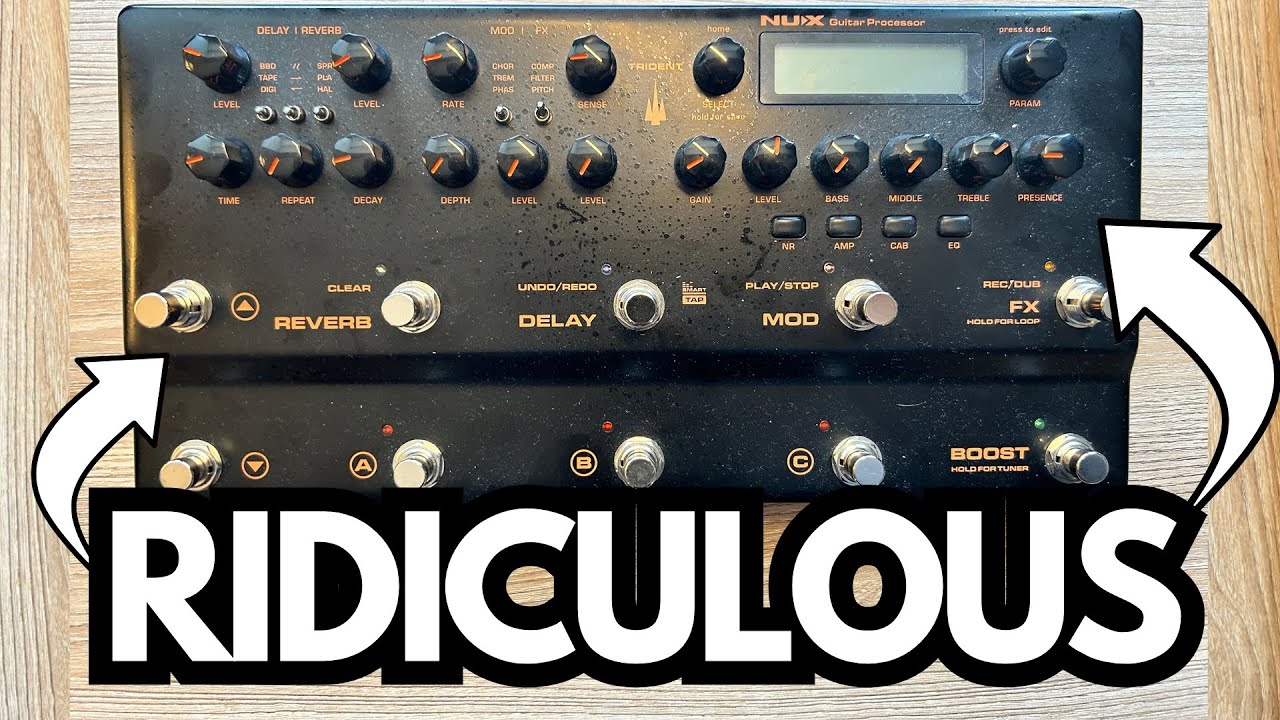
If you want a compact multi-effects unit that sounds great, covers almost every tone you’ll realistically need, and doesn’t bury you in menus, the NUX Trident is a very compelling option.
It’s aimed squarely at guitarists who care more about playing than tweaking, but still want serious flexibility for practice, recording, and even live use.
You can grab one here on Amazon if you’re interested.
This isn’t a toy: it’s a solid, steel‑cased processor with smart features, useful presets, and enough depth to grow with you—without feeling like you’re programming a spaceship.
Overview / First Impressions
The Trident immediately stands out for two reasons:
- It sounds genuinely good – from tight, modern “djent” tones and ambient cleans to grittier blues and rock sounds.
- It’s straightforward to use – especially if you’re the type of player who prefers good presets and light tweaking over building patches from scratch.
You can scroll through a large bank of presets (including artist-inspired settings like “Joko,” gent/djent tones, ambient cleans, and bluesy or grungy patches). Many of them are gig‑ and record‑ready right out of the box, with only minor adjustments needed for your guitar and playing style.
If your ideal unit is “plug in, pick a patch, tweak a little, and play for hours,” the Trident fits that bill nicely.
Build Quality & Design
One of the most satisfying aspects of the Trident is its physical design:
- Steel enclosure – The chassis is made from a high-quality steel casing, giving it a rugged, durable feel. It’s not flimsy and doesn’t feel like a cheap plastic box.
- Stable on the desk or floor – Rubber feet on the bottom keep it from sliding around. It sits nicely on a desk for home recording or on the floor as part of a pedalboard-style setup.
- Compact footprint – It doesn’t take up much space, which is great if your studio or practice area is already crowded.
Overall, it feels like a serious piece of gear that can handle real-world use, not something you’ll be afraid to stomp on.
Features & Functions
Despite being user-friendly, the Trident is packed with features that cover most modern guitar needs.
Core Processing
- Amp models – Multiple amp types for metal, rock, blues, and clean tones.
- Cab simulation – Cab options that pair with the amp models for convincing direct tones.
- Noise gate – Built-in noise reduction with adjustable threshold and decay.
- EQ – Onboard EQ to fine-tune your sound.
You can turn individual blocks (Noise Gate, Amp, Cab, EQ, etc.) on or off and adjust their parameters as needed.
Presets
The Trident ships with a wide range of presets, including:
- Gent/djent high-gain tones
- Ambient clean sounds
- Bluesy and grungy crunch tones
- Artist-inspired patches like the “Joko” settings
If you’re not a deep tweaker, you can live happily inside these presets and just nudge things like gain, EQ, or noise gate settings.
Built-In Tuner & Boost
The Boost footswitch has a dual function:
- Hold to engage the tuner – Press and hold to bring up a tuner so you can quickly tune your guitar. Release/hold again to exit.
- Tap for boost – Tap it for a clean boost to push your amp model or just get a volume lift for solos.
The tuner is standard fare for modern multi-effects, but it’s still a must-have and very convenient to access from the main playing surface.
Effects Loop (Send/Return)
One of the standout features is the effects loop:
- You can enable a send/return loop inside the unit.
- This allows you to integrate:
- External pedals (drive, modulation, etc.)
- Loopers
- Other processors
You access and enable the loop via the edit menu (more on the quirks of that below). Once set up, you can place your external gear within the Trident’s signal chain, which is extremely handy if you already own pedals you love.
Delay, Reverb & Harmonizer
The Trident also covers essential time- and pitch-based effects:
- Tap-tempo delay – You can tap in the delay time using the footswitch, then fine-tune:
- Level
- Rate/Time
- Repeats
- Decay
- Reverb – Various reverb options for everything from subtle space to more ambient washes.
- Harmonizer – Pitch-shifting and harmony effects for leads and melodic playing.
You can toggle things like reverb and harmonizer on/off and strip a patch down if you prefer a drier, more direct sound.
Audio Interface Capability
The Trident can function as a USB audio interface, meaning:
- You can plug it directly into your computer and record without a separate audio interface.
- It can serve as an all-in-one solution for guitarists who mainly record direct.
The reviewer mentions preferring a traditional audio interface in order to easily switch between microphones and the Trident, but it’s good to know you don’t need an external interface if you’re just tracking guitar.
How It Sounds / Use Cases
From a guitarist’s perspective, the Trident covers a lot of ground.
High-Gain & Djent
- Tight, modern metal tones are a clear strength.
- Gent/djent presets have the clarity and punch you’d expect for low-tuned riffs and chugs.
- The built-in noise gate is very effective at cleaning up hiss and hum when dialed in.
For metal players who want aggressive tone without endless tweaking, this unit delivers.
Ambient Cleans & Effects-Heavy Sounds
- Ambient clean presets sound lush and inspiring.
- Reverb, delay, and harmonizer options let you build spacious, cinematic tones.
- Tap-tempo delay makes it easy to lock in rhythmic echoes for modern worship, post-rock, or ambient playing.
It’s a strong option for players who like to live on the clean channel with lots of effects.
Blues, Grunge & Classic Dirt
There are presets geared towards dirtier, more organic tones:
- Grungy, mid-gain sounds
- Bluesy overdrive tones
These won’t necessarily replace a boutique tube amp, but they’re more than usable for practice, demos, and even gigging with a PA.
Practice & Recording
The Trident is particularly well-suited to:
- Home practice – Tons of usable tones without needing an amp; headphones + Trident = silent practice rig.
- Songwriting & demoing – Easy to get a solid tone quickly and record via USB or through an audio interface.
- Hybrid rigs – Use the effects loop to integrate favorite pedals or run it into a power amp and cabinet if you like.
Limitations / Things to Know
The Trident is not perfect, and there are a few quirks worth understanding.
Editing Workflow Can Be Confusing
The biggest complaint is the editing interface:
- To adjust certain blocks (like the send/return loop), you sometimes have to:
- Select the block (e.g., Send/Return),
- Then press a different button (like Cab, Amp, or NR) to actually change parameters.
- For example, enabling the send/return might involve:
- Selecting the Send/Return block,
- Pressing the Cab button,
- Then turning the knob to enable or adjust it.
- Similarly, to change the send level, you might need to press NR or Amp depending on the parameter.
This can feel unintuitive and a bit confusing until you’ve spent some time with the unit. Once you know the logic, it’s workable, but it’s not as immediately obvious as some competing units.
Knob Position vs. Preset Values
When you tweak a parameter with one of the physical knobs:
- The preset value changes as you turn the knob.
- However, if you exit the edit mode and later come back to that preset, it will load with its saved settings, not the physical knob position.
This is normal for digital gear, but it’s worth noting if you’re used to analog pedals where the knob position is the setting.
Not for Deep-Menu Tweakers (Depending on Taste)
If you love super deep editing on a big color screen, or want full-blown modeler complexity, the Trident might feel a bit more streamlined (or limited, depending on perspective). It’s more about:
- Solid presets,
- Practical editing,
- Getting a good tone quickly.
That’s a plus for many players, but it’s something to keep in mind if you’re expecting a full-on flagship modeler experience.
Final Thoughts
The NUX Trident hits a sweet spot for guitarists who want:
- Great tones across metal, ambient, clean, and classic rock/blues territory.
- Rugged build quality in a steel enclosure that feels gig-ready.
- Usable presets that don’t require hours of tweaking.
- Practical features like tuner, boost, effects loop, tap-tempo delay, harmonizer, and potential audio-interface functionality.
Its main downside is a somewhat quirky editing workflow, especially around enabling and adjusting certain blocks like the effects loop. But once you understand how the buttons and knobs interact, it’s a powerful and flexible tool.
If you like straightforward gear that sounds good and stays out of your way, the Trident is absolutely worth a look—whether you’re practicing at home, recording direct, or building a compact live rig.
Resources & Further Study
If you’re using something like the Trident to practice and want to improve your fretboard knowledge and improvisation, the following resource mentioned is especially useful:
- Fretboard Memorization Cheat Sheet (TravelingGuitarist.com) – A printable guide that maps out major and minor triads in every key using octave mapping and other visualization techniques. It helps you:
- Memorize the notes on the fretboard,
- Understand triads as the foundation of chords and harmony,
- Start improvising more confidently in multiple keys.
You can also join the community forum at forum.travelingguitarist.com to talk guitar, tone, and music with other players.