

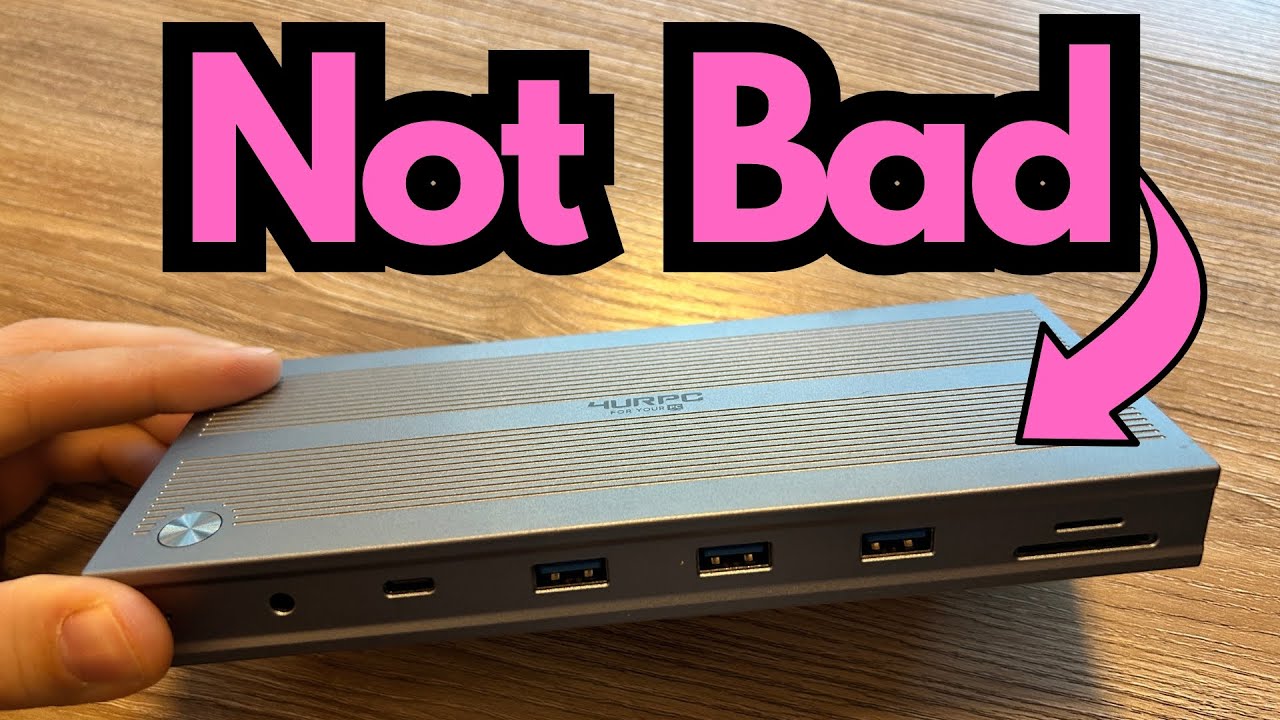
If you’re juggling multiple screens with a laptop or tablet, a solid USB‑C dock can completely change your workflow.
Whether you’re tracking guitars in a DAW, editing video, or just trying to keep reference material, plugins, and your main session visible at once, extra displays are a massive quality-of-life upgrade. You can grab it here on Amazon if you’re interested.
This compact triple‑display USB‑C dock aims to give you that full desktop experience from a single USB‑C connection—while staying small enough to toss in a gig bag or backpack. It’s not perfect, but it does a lot right.
Overview / First Impressions
This dock is designed for users who need more than just a couple of extra USB ports. Its main selling point is support for up to three HDMI displays, driven from a USB‑C connection to your computer.
First impression: it’s sleek, compact, and practical. It doesn’t take up much desk space, and it stays put thanks to rubber feet on the underside. For a mobile guitarist or content creator working in different locations—home studio, rehearsal room, office—this is a very packable hub.
However, there are a couple of immediate drawbacks:
- No labeling on the ports
- Requires driver installation (DisplayLink software) for multiple displays
If you’re used to more polished docking stations, these details stand out.
Build Quality & Design
Physically, this dock feels solid and well thought out in terms of form factor:
- Sleek and compact – Easy to fit under a monitor, beside a laptop, or in a small bag.
- Rubber stops on the bottom – Keep the unit from sliding around when you plug and unplug cables.
- Separate power brick with a slim plug – This is more important than it sounds. The power adapter uses a narrow, vertical-style plug that fits nicely on crowded power strips without blocking neighboring outlets. If you’ve ever tried to plug in a chunky wall wart behind a studio desk, you know how valuable this is.
From a guitarist/creator’s perspective, this is the kind of dock you can leave on your desk or easily bring along to a session with a laptop and still stay organized.
The main design miss: none of the ports are labeled. On competing docks (like some “10‑in‑1” units), each port is clearly marked with function and sometimes even speed. Here, you’re left to visually identify everything. It’s not a deal-breaker, but it’s not user-friendly either.
Features & Functions
Despite the small footprint, this dock packs a lot of connectivity. The layout includes:
- Triple HDMI outputs
Up to three external displays (great for DAWs, notation software, tab, YouTube reference, etc.). - USB‑C ports
One for connecting to your computer, plus an additional USB‑C for peripherals or possibly power (depending on your setup). - Multiple USB‑A ports
For interfaces, MIDI controllers, external drives, dongles, and other peripherals. - MicroSD and SD card slots
Handy for moving audio files, backing up sessions, or grabbing media from cameras. - Ethernet port
For a stable wired connection—great when you’re streaming, uploading large sessions, or working with cloud backups.
One cable runs from the dock to your USB‑C computer, and that’s what drives the displays and data. Power is handled via the separate power input on the dock’s brick.
For a guitarist/creator, this typically looks like:
- Laptop → dock via USB‑C
- Dock → audio interface, external drives, MIDI controller, ethernet, and up to three monitors
- All from a single connection to the laptop
Driver Requirement: DisplayLink
To get the second and third displays working, you must install DisplayLink Manager from the manufacturer’s website.
Key points:
- Without the driver, you won’t get full multi‑display functionality.
- Once installed, it typically works fine, but it’s an extra step.
- If you prefer true plug‑and‑play (no software), this is a drawback.
Some docks and adapters (like certain “10‑in‑1” USB‑C hubs) can drive dual displays without extra drivers, depending on your laptop’s capabilities. This one, however, relies on DisplayLink for triple-display support.
For live performance or mission‑critical sessions, you’ll want to install and test the driver ahead of time, not five minutes before a set or session.
How It Fits a Guitarist’s Workflow
The dock itself doesn’t affect audio tone, but it absolutely affects how you work with your gear.
Studio / Home Recording
- Run three screens:
Main screen: DAW arrange window (Logic, Reaper, Pro Tools, etc.)
Second screen: mixer, plugins, amp sims
Third screen: charts, lyrics, PDF lead sheets, or reference video - Connect an audio interface via USB for tracking guitars, vocals, and re‑amping.
- Plug in an external SSD for fast session storage.
- Use wired ethernet for stable online collaboration, plugin license checks, and backups.
Content Creation & Teaching
- Triple displays make it easier to record screen tutorials, manage streaming overlays, and keep notes visible while recording.
- The SD/microSD slots are handy if you’re moving footage from a camera to edit guitar lesson videos.
Mobile / Hybrid Setup
- Because it’s compact and doesn’t slide around, you can set it up quickly in different rooms or locations.
- Drop it in your bag with your laptop and interface, and you’ve got a portable “command center” for writing, recording, and editing.
Limitations / Things to Know
1. No Port Labels
You don’t get any printed labels on the chassis:
- No indication of which USB ports are higher speed.
- No quick visual reference for what’s what.
You’ll learn the layout over time, but it’s less intuitive than it should be—especially if you’re frequently plugging and unplugging gear during a session.
2. Driver Dependency
- To use all three HDMI outputs, you must install DisplayLink Manager from the manufacturer’s website.
- If you move between multiple computers (studio PC, laptop, work machine), each one needs the driver installed.
- Some users prefer pure hardware solutions that don’t rely on software for display expansion.
3. Imperfect, But Functional
The dock works and does what it promises—triple display, plenty of ports, compact size. But it’s not as polished as some higher‑end docks that offer:
- Clear port labeling
- Sometimes driver‑free multi‑display (depending on host system)
- More detailed documentation
If you already own a simpler dual‑display adapter that doesn’t require drivers, you might prefer that for everyday use and keep this dock for when you specifically need three screens.
Final Thoughts
This compact triple‑display USB‑C dock is a practical, capable tool if you:
- Need three external displays from a USB‑C laptop
- Want a small, stable dock with enough ports for a full studio or creator setup
- Don’t mind installing DisplayLink drivers to unlock full functionality
Its main downsides—no port labels and driver dependency—are annoyances rather than deal‑breakers. From a guitarist’s perspective, it’s a strong option if you want to turn a single USB‑C laptop into a full multi‑monitor studio rig without dedicating half your desk to a giant dock.
If you prioritize plug‑and‑play simplicity and don’t need three displays, a well‑designed dual‑display hub might be a better fit. But if triple display is the goal in a compact form factor, this dock gets the job done.
Resources
- DisplayLink Manager – Required software to enable the second and third displays. Available from the manufacturer’s website; install it on each computer you plan to use with the dock.